
Dripify Pricing 2026: What You'll Really Pay per User

Dripify used to have a cheap plan to start on. Now Dripify pricing starts at $79 per user a month on Pro, and one user is one LinkedIn account. The Basic plan is gone. I ran Dripify's full seven-day trial in August, with no card, on Advanced features. So I know what you get on each plan, and what you give up on the cheaper one. Here's what Dripify really costs, and why the plan you need may not be the one you start on.
What Dripify costs per month
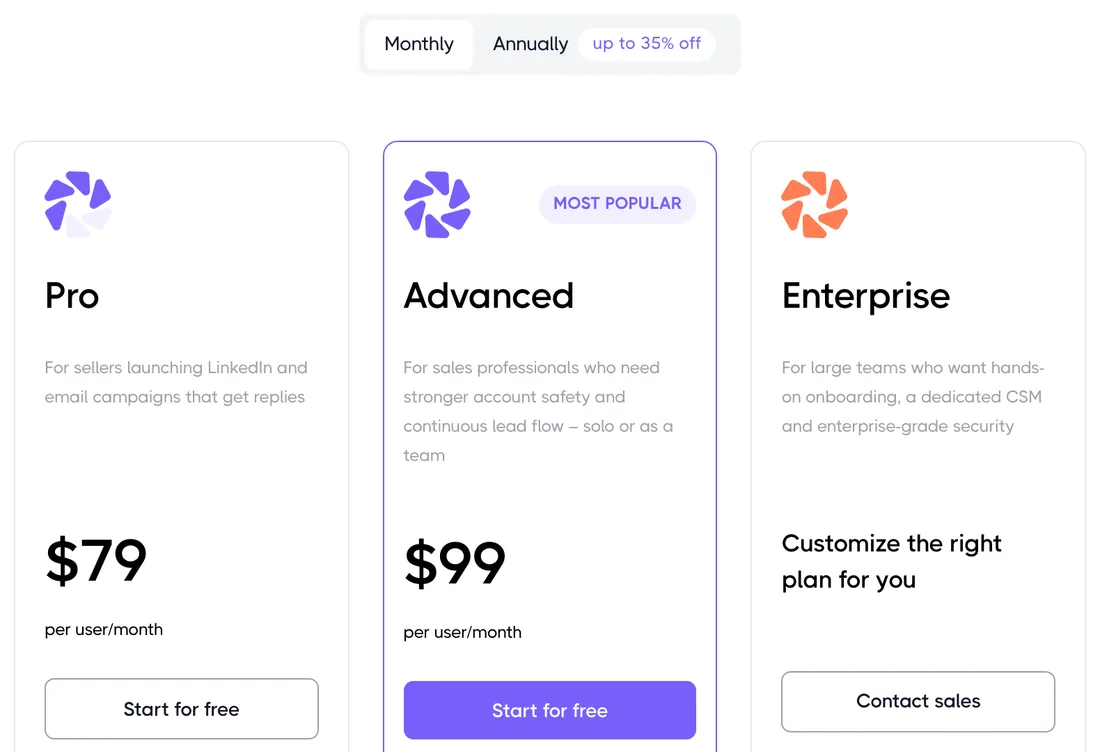
Dripify pricing works per user. A user is one seat, and each seat connects one LinkedIn account. So if your team has five reps, you need five seats.
The plans, at the monthly rate:
| Plan | Price | Included |
|---|---|---|
| Pro | $79 per user a month | LinkedIn and email steps, inbox, CSV, HubSpot |
| Advanced | $99 per user a month | Pro plus pacing, A/B tests, step analytics, tagging |
| Enterprise | Custom quote | Onboarding, dedicated support, success manager |
If you sell alone, the price is easy to follow. Now say you run a team of five reps. On Pro, you pay $395 a month. Want A/B tests and automatic pacing? Advanced takes you to $495. Every seat moves the bill.
Free trial, yearly billing and coupon codes
The free trial gives you seven days with Advanced features, and no card. Nothing is charged when it ends.
When I opened the pricing page, it loaded on yearly billing. So the first prices you see are the discounted ones. Billed yearly, Pro is $59 per user a month, paid for the year up front. The toggle says up to 35% off, but no plan saves that much. Pro saves about 25%, and Advanced about 20%.
If a review site shows you a Basic plan at $59 a month, it's out of date. Dripify removed it in October, so Pro is where you start now.
I looked for a Dripify coupon code and found none. Yearly billing is the only discount on the page. From ten seats, ask sales: Dripify says larger teams may get a volume discount, but publishes no figure.
What each Dripify plan gets you
One thing in its favor: Dripify pricing is public, and the plans are easy to compare. Since Basic left, there are two to choose from. What changes between them is how safe and testable your sending is.
Pro ($79 per user)
Pro is for a seller who wants LinkedIn and email in one sequence. You get unlimited campaigns, an email finder, a dedicated inbox, CSV export, webhooks and a HubSpot sync. I built my first campaign from a LinkedIn search URL in a few minutes. For one account and one audience, Pro does the job.
The catch? Pro leaves the pacing to you. A new account should ramp up slowly, and on Pro you raise its limits by hand each week. A/B tests aren't on Pro either, so you can't test a message before you scale it. My advice on Pro: set a weekly reminder to raise your limits.
Advanced ($99 per user)
Advanced is Dripify's "most popular" plan, and it's what the trial runs on. It adds activity control, which paces each account for you, and A/B tests, still in beta. You also get step analytics, lead tagging, evergreen leads and every team feature.
That's $20 more per user, every month. For a team of five, you pay $495 a month instead of $395. (Replygrow, our tool, includes both on every account.) If you send at volume, it's the plan I'd pick on Dripify.
Enterprise adds premium onboarding, dedicated support and a customer success manager. You get that price on a sales call, and so does any team of ten seats or more.
What you pay on top of the plan
Dripify's plan cards are accurate, but they're not everything you'll pay. If you use Sales Navigator, budget for LinkedIn's bill too, whatever tool sends.
The trial is Advanced; your plan may not be. Your seven days run with every Advanced feature. Pick Pro afterwards, and activity control and A/B tests switch off. Keeping them costs $20 more per user a month.
Warm-up by hand on Pro. Dripify's help center lays out a week-by-week ramp for a new account. On Advanced, activity control does it for you. On Pro, it's your job, and that time isn't on the pricing page. Ramp too fast, and you could end up with a restricted account.
Email finder credits. Every plan includes 100 credits a month, and they expire after 30 days. Past that, packs start at $29 for 1,000. A credit only goes when an address is found and verified, so this matters at volume.
Refunds are narrow. Monthly payments are non-refundable. A yearly plan is refundable only within 24 hours of payment. After that, the plan runs to the end of the term. Since the page opens on yearly, check the toggle before you pay.
When I price five reps on Advanced, the plan I trialed, it's $495 a month before any credit packs. Pro saves you $100, and hands you the pacing.
Dripify pricing vs Replygrow
If you want Dripify's Advanced features without the Advanced price, Replygrow is the tool we built for that.
You pay $79 per account a month instead of $99, less than Advanced at every size. Every account also gets what Dripify keeps for Advanced: automatic pacing and A/B tests. From five accounts, the volume discount kicks in and keeps growing, up to 50% off at fifty accounts.
Run an agency? You won't need a sales call as you sign clients. Each client gets a company of its own, with a dashboard it logs in to. Replies from every account land in one inbox. Each account sends through a dedicated residential proxy, and new accounts warm up on their own.
Here's what each price includes, and what you'd pay each month:
| In the price | Dripify Advanced | Replygrow |
|---|---|---|
| Pacing and A/B tests | Advanced only | Every account |
| One inbox for all accounts | No | Yes |
| A login for each client | No | Yes |
| One account, per month | $99 a month | $79 a month |
| Five accounts, per month | $495 a month | $375 a month |
| Ten accounts, per month | Quote; $990 at list | $711 a month |
| 5 accounts, Pro billed yearly | $295 a month | $314 a month |
Against Advanced, you pay less at every size. Against Pro billed monthly, you pay the same for one account and less from five, with pacing and A/B tests inside.
Where Dripify earns its price
For a seller who wants LinkedIn and email in one sequence, Dripify does the job well. You'll have a campaign running in minutes, and the dashboard is easy to read. On my trial, live chat answered my questions fast. Dripify is rated 4.5 from 348 reviews on G2 and 4.7 from 540 on Trustpilot.
So Dripify pricing comes down to two lines. On Pro, you get the tool. On Advanced, you get it safe and testable. The price you see first is Pro. The plan you'll likely need is Advanced.
Picture yourself adding a fresh LinkedIn account on Pro. Every Monday, you open the limits and nudge them up by hand. Forget a week, and the account stalls. Push too fast, and you put it at risk. That doesn't make Dripify a bad deal. It makes Advanced the real price.
For the product itself, read the Dripify review.
Who Dripify suits, and who it doesn't
The answer turns on how many accounts you run, and who paces them.
Pick Dripify if
- You run one account, pay yearly, and Pro covers you.
- You want LinkedIn and email steps in one sequence.
- You don't mind raising your limits by hand each week.
Pick Replygrow if
- You want automatic pacing without paying for Advanced.
- You run five accounts or more, where Replygrow's rate starts to drop.
- You run client accounts and want each client to log in.
Can't decide? Put one campaign on both free trials and see which you'd keep. Running client accounts? Each client gets a company of its own in Replygrow. To see the rest of the field, there's the ranking of LinkedIn automation tools.
The bottom line on Dripify pricing
Dripify pricing starts at $79 per user a month on Pro. On Pro, you get the tool. On Advanced, you get the pacing and A/B tests that make it safe and testable.
Price the plan you'll actually run, not the one on the first card. For most teams sending at volume, that's Advanced.
Dripify is a good tool with an honest price list. It's built for sellers who want LinkedIn and email in one place. If you'd rather have Advanced's features without the Advanced price, Replygrow puts them in every account.
Frequently Asked Questions
1) How much does Dripify cost per month?
Dripify costs $79 per user a month on Pro, and one user connects one LinkedIn account. Advanced is $99 per user a month. Yearly billing lowers both rates. From ten seats, you get a price from sales.
2) Which Dripify plan should you choose?
Pro, if you run one account and can pace it by hand. Advanced, if you want activity control, A/B tests or team features. Enterprise is for large teams that want onboarding and a success manager.
3) Does Dripify have a free trial?
Yes. You get seven days with Advanced features, and no card. That's how I signed up in August. Nothing is charged when it ends, and there's no free plan after it.
4) Is there a Dripify coupon or discount code?
No. I found no coupon code. The lasting discount is yearly billing: about 25% off Pro and 20% off Advanced. Teams of ten or more can ask sales for a volume discount.
5) Does Dripify give refunds?
Only on yearly plans, and only within 24 hours of payment. Monthly payments are non-refundable. If you cancel, your plan runs to the end of the term you paid for.
6) How do Dripify email finder credits work?
Every plan includes 100 credits a month, and unused ones don't roll over. A credit is used only when Dripify finds and verifies an address. Extra packs start at $29 for 1,000 credits.
7) Dripify vs Replygrow pricing: what's the difference?
Replygrow costs less than Dripify Advanced from the first account up: at five accounts, it's $375 a month against $495. Pro billed yearly is cheaper under ten accounts, but leaves out A/B tests and pacing. Every Replygrow account includes A/B tests and automatic pacing. For more tools side by side, see the comparisons.
Get 3x more replieson LinkedIn
Set up in minutes. 7-day free trial, no credit card.
Try Replygrow free