Dripify Review 2026: Features, Pros & Cons, Verdict

Considering Dripify for your LinkedIn outreach? This Dripify review covers what it does, how each feature works and where it falls short.
I ran Dripify for 14 days with one real campaign, starting on its seven-day trial in August 2026. Then I read what users say on G2, Capterra and Trustpilot.
It's for sales reps, recruiters and founders weighing Dripify against other LinkedIn automation tools.
Dripify at a glance
Dripify is a cloud LinkedIn automation tool for prospecting. You build a sequence of steps, like a profile view, an invitation and a follow-up, and it sends them for you.
It runs in the cloud, so your campaign keeps going with the laptop closed. It's aimed at sales reps, recruiters and small teams, and you connect one LinkedIn account to each seat.
My first impression was a tidy dashboard and a setup that took minutes. You'll see the campaign list, each campaign's lead stages and its reply rate without opening a menu.
| Verdict | Dripify |
|---|---|
| Price | $79/user/month on Pro |
| Best for | Solo sellers mixing LinkedIn and email |
| Integrations | Native HubSpot (one-way) on every plan |
Dripify pros and cons
| Pros | Cons |
|---|---|
| Quick to set up, with pre-built sequence templates | The trial runs on Advanced, so Pro drops features you tried |
| A clean dashboard with acceptance and reply rates per campaign | Automatic pacing and A/B testing sit on Advanced |
| Live campaigns can be edited without a restart | No published volume discount, and ten seats or more is a sales call |
| Funnel stages that show where every lead stands | No client login or white-label for agencies |
| Live chat and a help center guide for each step | Restriction reports, and a verification check in my own test |
Dripify feature overview
The rest of this Dripify review follows the app in the order you meet it. That means leads and a sequence first, then message tests, the inbox and the features for teams.
1. LinkedIn campaigns and the sequence builder
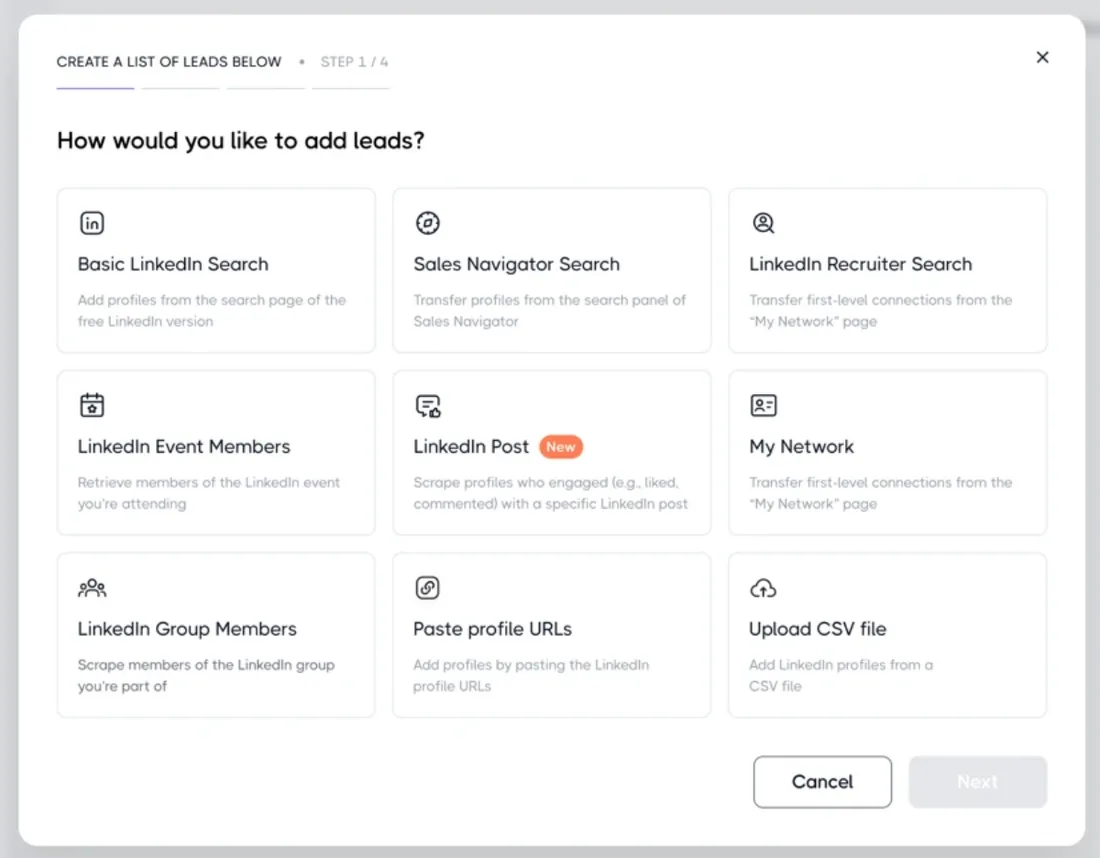
You connect your LinkedIn account with your login, or through an optional Chrome extension. Setup took me a few minutes. Then you paste a LinkedIn search URL, name the list and pick a sequence template.
The templates cover lead generation, InMail outreach and event invitations, and they're a real time-saver for a first campaign. Dripify fetches the leads in the background, and I came back to a full list with no babysitting.
The dashboard lists each campaign's status and how many leads are in its pipeline. Each campaign also has an Audience tab that sorts the leads by stage: in progress, awaiting, paused, completed, failed and blacklisted, which makes it easy to see where a campaign stands.
A color-coded graph shows how many leads sit at each stage. Numbers per step, like each message's reply rate, come from step analytics, a beta on Advanced. Tags for sorting leads, and evergreen lists that refresh a search every week, wait for Advanced too.
CSV export of your leads is on every plan. To keep someone out of every campaign, select them in your leads and choose Add to blacklist.
Dripify takes at most 2,475 profiles from one Sales Navigator search, just under LinkedIn's own limit of 2,500. For a bigger audience, you split the search and load each slice as its own list.
Before a list saves, you can drop leads already in another campaign or a teammate's, leads without a photo and leads on a free LinkedIn account, which keeps a list clean. You can pull leads from:
- A LinkedIn search URL, or one from Sales Navigator or Recruiter
- Your own network, plus LinkedIn events and groups
- The people who liked or commented on a post
- A CSV file of LinkedIn profile URLs
The sequence builder and conditions
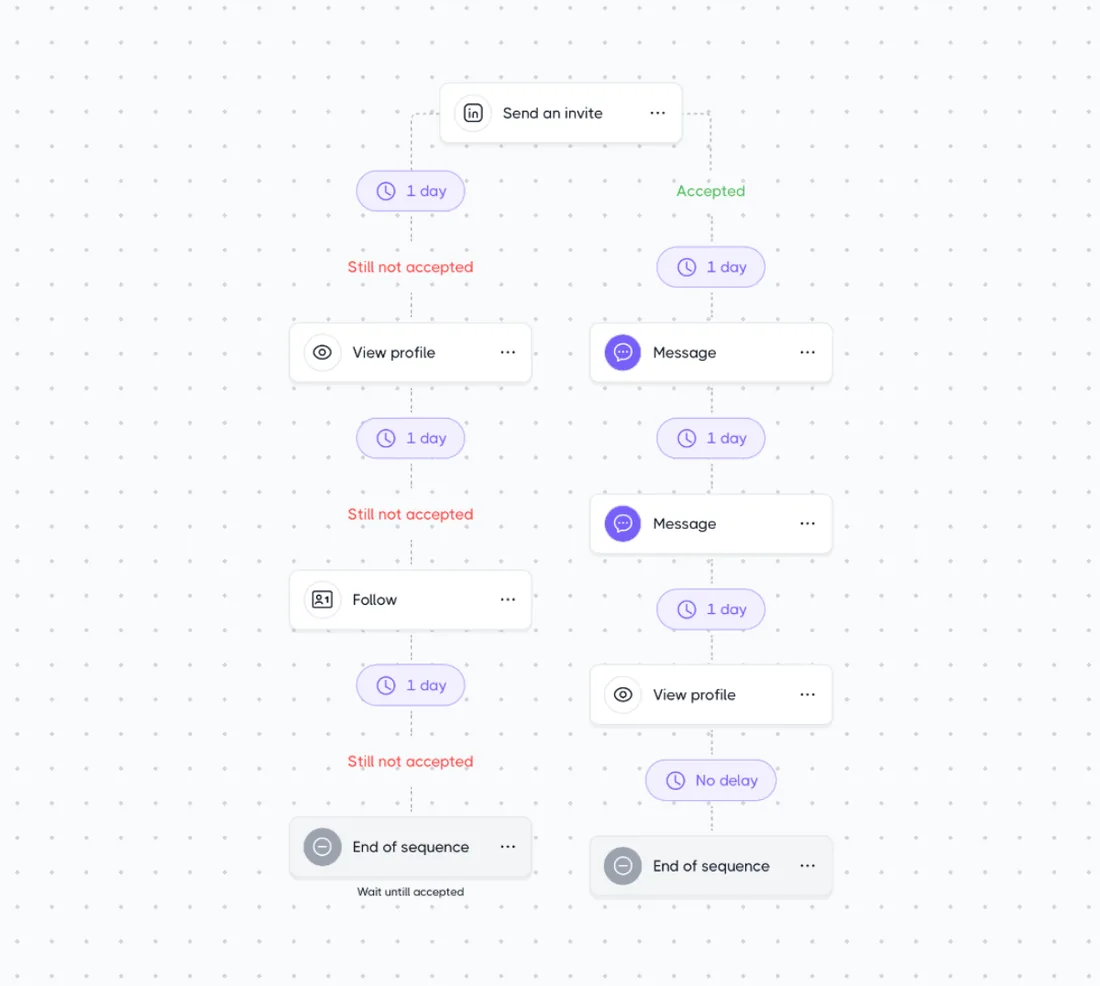
You'll see the sequence as a column of steps with a delay between each, and it's clean and easy to follow. Click a step and its message and delay open, ready to edit.
I kept the template's shape: a profile view, an invitation, a message and a follow-up. Then I rewrote every message and stretched the delays, since the defaults move faster than I'd send by hand.
Dripify's help center lists ten actions and four conditions to build from. On LinkedIn, a step can view a profile, follow or unfollow someone, like a post, endorse skills, or send an invitation with or without a note. It can also send a message, send a Sales Navigator InMail that spends one of your InMail credits, or withdraw a pending invitation.
The conditions check whether a lead is connected to you, viewed your message, has an email address or has an open profile. Each one checks once, when the lead reaches it. A lead who opens your message an hour later stays on the branch they were sent down.
You can edit a live campaign, and adding steps doesn't restart it. Conditions can't be deleted once it runs, though, so plan the forks before you launch.
You set daily numbers per action, under LinkedIn's connection limits. Run two campaigns, and Dripify shares those actions between them. The Range option varies the daily count, so your account never sends the same number two days running.
2. A/B testing and personalization
In my August trial, a message step showed a Run A/B test button. It split my leads across up to three versions of an automated message, and since September it also works on invitations, emails and Sales Navigator InMails.
Versions are named A, B and C automatically, and each one gets its own numbers. The results are simple to read. Three versions is a sensible cap, since more versions leave fewer leads in each.
Testing an invitation note also needs a LinkedIn Premium plan that allows notes. And Dripify's help center lists A/B testing as a beta on the Advanced plan.
Profile variables drop in from a menu as you type, and you get them on every plan. What I'd miss on Pro is the test itself.
My advice if you stay on Pro: change one line at a time, and give it a week before you judge it.
3. The inbox
Dripify's Smart Inbox comes with both plans, one inbox per LinkedIn account. You'll see conversations with your Dripify leads only, so your inbox stays free of noise.
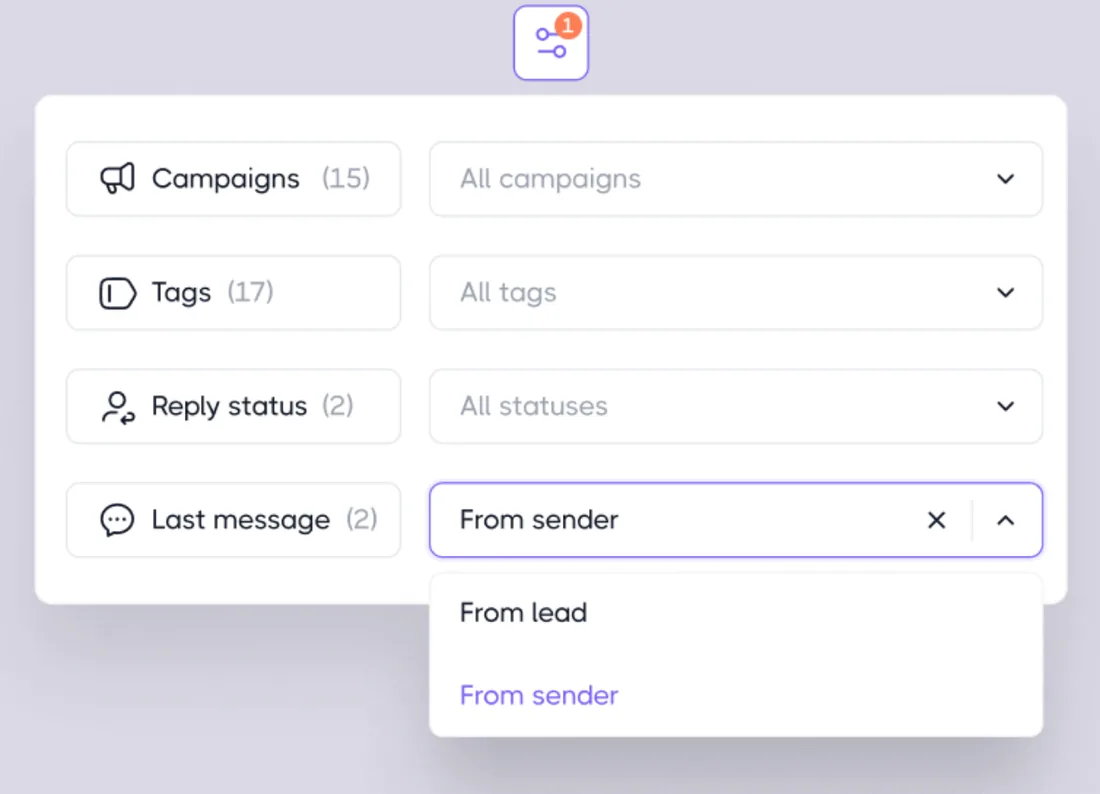
Filters sort by campaign, by reply status and by who sent the last message. The last-message filter is the quickest way to find chats that still need your answer. The menu also has a Tags filter, which only helps on Advanced, where lead tagging lives.
Each conversation shows the lead's profile and your notes beside the thread. You can star the chats that matter, and a refresh button pulls in new replies at once.
You reply without opening LinkedIn, which kept me out of LinkedIn's own inbox all week. I liked it more than I expected. Add a second LinkedIn account, though, and you have a second inbox to check.
4. Teams, clients and integrations
Dripify's answer to a second teammate or a first client is multi-team management, and it sits on Advanced. One admin oversees several teams from a single login.
You can assign roles and share templates, which is a real time-saver when a new rep joins. Duplicate prevention keeps two reps off the same lead, and Dripify skips anyone who already got the same message from you.
Team analytics break acceptance and reply rates down by team and by teammate. Its agency page pitches a team per client on Advanced, with reports you export and send. Your clients never log in themselves, and there's no white-label.
Webhooks, Zapier, Make and a native HubSpot integration come with every plan. You set webhooks up campaign by campaign, and the HubSpot sync runs one way, from Dripify to HubSpot.
For an in-house team of a few reps, that covers the basics. For an agency, the missing client login is the gap you'll feel first.
Is Dripify safe?
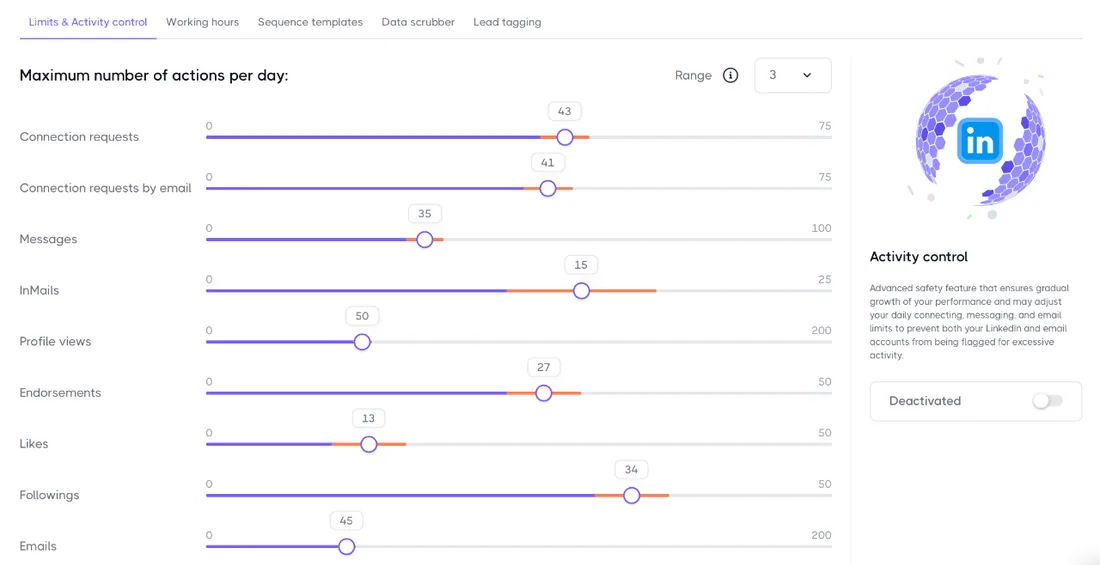
Dripify's help center calls it "one of the safest LinkedIn automation tools available on the market." It says each account "gets its own IP address based in your region," and both plans list human behavior simulation.
Every plan goes up to 75 connection requests and 100+ messages a day, set in the Limits & Activity tab. You also choose the days and hours your campaigns run.
Activity control adjusts each account's daily limits to its history, and the trial shows it. On Pro it's gone. A G2 reviewer complained in February 2025 about "not being able to have activity control without the most expensive plan."
The help center spells out a month-long warm-up. On Advanced, activity control paces it for you. On Pro, you raise your limits by hand each week.
I ran Dripify for 14 days, and on day 10 LinkedIn asked me to verify my account for suspicious activity. Other users report restrictions, like one Trustpilot reviewer in August 2026: "I keep getting restricted on LinkedIn with the connection caps."
Every LinkedIn automation tool carries some account risk. If LinkedIn does restrict you, our guide to a restricted LinkedIn account covers the first hour.
Dripify pricing
Dripify sells two plans, and each LinkedIn account needs its own seat:
| Plan | Price | Included |
|---|---|---|
| Pro | $79 per LinkedIn account a month | Inbox, CSV export, webhooks, HubSpot sync |
| Advanced | $99 per LinkedIn account a month | Pacing control, A/B tests, team tools |
The seven-day free trial asks for no card, and nothing is charged when it ends. Signing up was painless, and live chat answered my trial questions quickly.
The catch: the trial runs on Advanced. Pick Pro, and activity control, A/B testing, step analytics, lead tagging and every team feature are gone. So note which of those you used before you choose a plan.
If your leads come from Sales Navigator, add its cost to each account.
Yearly billing, refunds and the cost as you add accounts are in our Dripify pricing breakdown.
Is Dripify right for you?
Dripify suits a solo seller with one LinkedIn account who wants email steps in the same sequence. Look elsewhere if you want:
- Every feature on your first plan
- One inbox for all your accounts
- A login for your clients
- A rate that drops as you add accounts
Replygrow: a more cost-effective Dripify alternative
If you want more features, safer accounts and a lower bill than Dripify, Replygrow is the tool we built for that.
- A lower price: $79 per account a month, against $99 on Dripify Advanced. Dripify publishes no volume discount.
- Discounts as you grow: five accounts cost $375 a month, against $495. Up to 50% off at 50.
- Every feature, one plan: five lead sources, one inbox for all accounts, a dashboard login per client and A/B tests.
- Safer accounts: a dedicated residential proxy and a 14-day warm-up from 5 to 30 invitations a day on every account. Restrictions are rare, though no tool rules them out.
- More replies: teams on Replygrow see a 15–35% higher response rate and 3x more meetings booked weekly.
- Easy to start: 7 days free, no card, and your first campaign runs today.
With Replygrow, the plan you start on is the whole product. Every rate is on the pricing page.
Other Dripify competitors
Replygrow is our pick, but these are worth comparing too:
Or see them side by side in the LinkedIn automation comparisons.
Dripify review verdict: is it worth it in 2026?
Our score
3.5/5
Dripify's pacing and A/B tests cost a tier up, and clients get no login of their own.
Dripify is a nice, easy tool, but the plan that makes it safe and testable is Advanced, not Pro.
My Dripify review comes down to this: setup is quick and the inbox is tidy, but you pay the Advanced price for pacing and A/B tests, and your clients never get a login.
Replygrow takes the lead with more features on one plan, a dedicated residential proxy and warm-up on every account, a rate that drops as you grow, and one inbox for every account.
Frequently Asked Questions
1) What is Dripify and what does it do?
Dripify is a cloud LinkedIn automation tool that sends profile views, invitations, messages and InMails for you in a sequence. It's an established, legit tool, rated 4.7 from 477 reviews on Capterra.
2) How does Dripify work?
You connect a LinkedIn account, paste a search URL or upload a CSV, and pick a sequence template. Then you set the delays and daily limits, and Dripify runs the campaign in the cloud.
3) How much does Dripify cost?
Dripify costs $79 per LinkedIn account a month on Pro and $99 on Advanced. Pacing and A/B tests need Advanced.
4) Is Dripify free?
No. Dripify has no free plan, but its seven-day trial runs on Advanced features with no credit card, and nothing is charged when it ends.
5) Is Dripify allowed by LinkedIn?
Dripify carries the account risk every LinkedIn automation tool does. It gives each account its own IP address in your region, but automatic pacing is Advanced-only, so on Pro you warm up by hand. Some users still report restrictions.
6) What are the best Dripify alternatives?
Replygrow, the tool we built, is the one to try first: more features on one plan, safer accounts, a rate that drops as you add accounts, and one inbox for every account. HeyReach, Expandi and Waalaxy are the other names to compare.
7) Dripify vs Replygrow: what's the difference?
Dripify splits its features across two plans, and Replygrow has one. Pacing, team features and A/B tests sit on Dripify's Advanced plan. Replygrow puts every feature on every account, with one inbox, a dedicated residential proxy and warm-up, for less than Advanced, and publishes discounts up to 50% as you add accounts.
Get 3x more replieson LinkedIn
Set up in minutes. 7-day free trial, no credit card.
Try Replygrow free