
Expandi Pricing 2026: What You'll Really Pay per Seat

Open Expandi's pricing page and it looks almost too simple: one plan with a price, and one without. Expandi pricing starts at $99 per seat a month on the Business plan, and a seat is one LinkedIn account. That holds while you run up to nine accounts. At ten, your price turns into a sales call. I signed up in August, and a card checkout opened before my trial began. Later I asked for a ten-account price, and Expandi wanted a call first. So here's what each plan really costs you, and what the $99 leaves out.
What Expandi costs per month
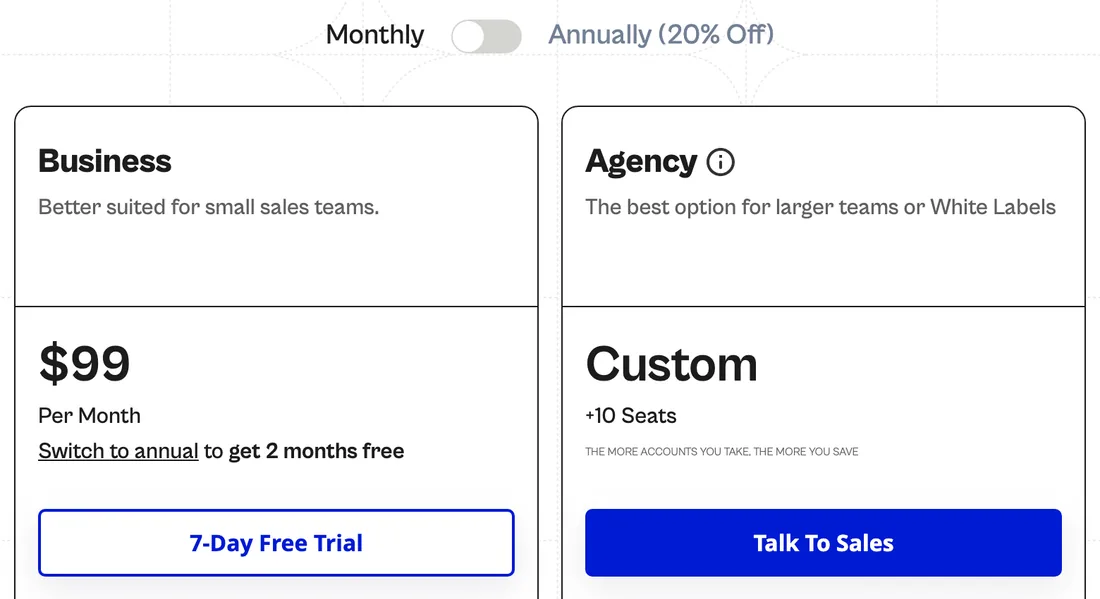
Expandi pricing works per seat. A seat is one LinkedIn account you connect. Teammates and clients log in for free, so your bill follows your accounts, not your headcount.
The two plans, at the monthly rate:
| Plan | Price | Included |
|---|---|---|
| Business | $99 per seat a month for one to nine seats | Dedicated IP, warm-up, Global Inbox, integrations |
| Agency | Custom quote | From ten seats: white label, roles, client reports |
For one account, $99 is easy to read. Now say you run five accounts for a small sales team. You pay $495 a month. Grow to nine and you're at $891. The rate never moves, from your first seat to your last. Then, at ten, the price leaves the page.
Free trial, yearly billing and coupon codes
The free trial gives you seven days with every feature. It takes a card, though. When I signed up in August 2026, a Stripe checkout opened as I added my LinkedIn account. Expandi's FAQ spells out the rest: "you will be charged for the billing period you selected, unless you cancel your subscription first." On monthly billing, a missed date costs you $99 a seat.
When I opened the pricing page, it loaded on monthly. Switch to yearly and Business drops to $79 per seat a month. You pay the whole year up front. Expandi calls it two months free.
There was no Expandi coupon code or sale when I checked. Past nine seats, Expandi hints at volume deals but names no figure. And ignore any Agency price you see on review sites. Expandi doesn't publish one.
What each Expandi plan gets you
To be fair, Expandi packs a lot into one seat. What changes at ten seats isn't the product. It's how you find out the price.
Business ($99 per seat)
Business is where you start, and it's the only plan with a price. Each seat gets a dedicated IP from a data center, in the country you pick, plus a profile warm-up. You get the full builder, with email and CRM steps inside one LinkedIn sequence. Webhooks and an MCP server, still in beta, come with it. For a small team, that's a lot in one seat.
The catch? The rate is flat. There's no discount at five seats, and nothing published past nine. The card also promises unlimited campaigns, while the help center says "You can have 15 active campaigns at a time". So plan around 15 live campaigns per account, with LinkedIn's own limits on top.
Agency (from ten seats)
Agency is for shops that resell outreach under their own brand. It starts at ten seats and adds white-label, with your own domain and email sender. You also get roles and permissions, client reports and a dedicated success manager. Client logins are free on Business too, so you don't need Agency just to let a client in.
The catch is the price. The card says "+10 Seats" and "Talk To Sales", and nothing else. The FAQ promises "The more seats you acquire, the greater your potential discounts", with no number. That matches what I found: I asked for a ten-account price in writing and was asked onto a call. (Replygrow, our tool, shows its rate at every size.) If you go this way, get the quote in writing before you commit.
What you pay on top of the plan
Expandi's plan card is accurate. It just isn't the whole bill. If you use the InMail step, you need Sales Navigator, and the visitor signals need Premium or Sales Navigator. That's LinkedIn's bill, not Expandi's.
Image and video personalization. The personalized images, GIFs and videos Expandi shows off come from other companies. For images and GIFs, you pay Hyperise from $69 per seat a month. For video, you pay Sendspark from $49 a month. You don't need either, and neither is in your $99.
Seats bill until you remove them. When I added a seat mid-cycle, it was charged right away, as its own payment. Unplug an account and you still pay for its seat. The help center is blunt: "Disconnecting a seat from a LinkedIn account doesn't cancel the seat." So remove the seat, not just the account.
No refunds. The terms say "subscription fees paid by the Customer are non-refundable", unless the law says otherwise. If you forget the trial, that's covered too. Cancel, and you keep access to the end of the period. You can't pause.
When I add it up for five accounts, Business is $495 a month before any add-on. For ten, I couldn't add it up at all. The page stops at nine, and the rest is a phone call.
Expandi pricing vs Replygrow
Replygrow, the tool we built, costs less per account than Expandi from one account to nine, monthly or yearly.
One account costs you $79 a month against $99. From five accounts the rate drops, and it keeps dropping, up to 50% off at fifty accounts. That's the volume discount, and it's on the page, not behind a call.
For a growing team, that means you can price account ten, or forty, before you sign. Every account you add also includes its own dedicated residential proxy, not a data-center IP. And when you start a Replygrow trial, there's no card to enter and no date to watch.
Here's what you get with each, and what you'd pay each month:
| What you get | Expandi | Replygrow |
|---|---|---|
| A proxy for every account | Data-center IP | Residential |
| A free trial with no card | Card first | No card |
| A listed price from ten accounts | Sales call | On the page |
| One account, per month | $99 a month | $79 a month |
| Five accounts, per month | $495 a month | $375 a month |
| Ten accounts, per month | Quote; $990 at list | $711 a month |
| 25 accounts, per month | Sales call | $1,481 a month |
At every size Expandi prices, that's less money each month. Past nine, you still know your bill before anyone books a call.
Where Expandi earns its price
For deep LinkedIn sequences, Expandi does the job well. One flow can mix LinkedIn steps with email and CRM actions, and warm-up comes in the seat. You can bring teammates and clients in for free on any plan. Expandi is rated 4.3 from 161 reviews on G2 and 4.4 from 235 on Trustpilot.
Boil Expandi pricing down, and you get two lines. Under ten accounts, the price is one number. At ten, it's a phone call. And the personalization it demos is somebody else's bill.
Picture your team growing from nine accounts to ten. You'd expect $990 a month. Instead, the page sends you to sales, and your budget waits on a call. The image personalization from the demo is a second invoice. Expandi isn't a bad deal for it. It's a deal you finish on the phone.
The product itself gets its own look in the Expandi review.
Who Expandi suits, and who it doesn't
It mostly depends on your account count, and how you feel about sales calls.
Pick Expandi if
- You run one to nine accounts and need email and CRM steps in one sequence.
- You want image or video personalization and will pay Hyperise or Sendspark for it.
- You resell outreach under your own brand and don't mind a sales call.
Pick Replygrow if
- You want a lower price per account, with the rate on the page at every size.
- You want a residential proxy on every account, not a data-center IP.
- You'd rather start a trial without a card.
Not sure yet? Try one campaign on both free trials. Just set a reminder before Expandi's ends. Selling to clients? Replygrow gives each client a company of its own. Want the wider field? Here are the LinkedIn automation tools ranked.
The bottom line on Expandi pricing
Expandi pricing starts at $99 per seat a month, and it stays there up to nine accounts. At ten, the price becomes a sales call. And the image and video personalization it demos costs extra.
Replygrow costs less per account than Expandi from one account to nine, so the real question is what you want in each seat. Whichever you try, count the add-ons and watch the trial date.
Expandi is a capable tool with a deep builder. It's built for teams that need email and CRM steps in one sequence and don't mind a call at ten. If you'd rather see your price at every size, Replygrow puts it on the page.
Frequently Asked Questions
1) How much does Expandi cost per month?
Expandi costs $99 per seat a month on Business, and one seat is one LinkedIn account. Yearly billing takes 20% off, paid up front. From ten seats, Agency is priced on a sales call. Image and video personalization cost extra.
2) Does Expandi have a free trial?
Yes, seven days with every feature, but it takes a card. When I signed up in August 2026, a Stripe checkout opened as I added a LinkedIn account. The trial then turns into a paid plan unless you cancel. Set a reminder for the day before it ends.
3) Is there an Expandi coupon or discount code?
No. I found no coupon code or sale. The one lasting discount is yearly billing, at 20% off. From ten seats, Expandi hints at volume deals, but only on a call.
4) Will Expandi charge me after the free trial?
Yes, unless you cancel first. Your card is on file, and the trial becomes a paid plan for the period you picked. The terms say fees are non-refundable unless the law requires otherwise. So a forgotten trial stays paid.
5) How much is Expandi's Agency plan?
Expandi doesn't publish it. The Agency card reads "+10 Seats" and "Talk To Sales", so the price comes from a call. It adds white-label, roles, client reports and a success manager. Any Agency figure you see on a review site doesn't come from Expandi.
6) Is there a subscription for Expandi, and is it per seat?
Yes. Expandi is a monthly or yearly subscription per seat, and one seat connects one LinkedIn account. Teammates and clients join for free. Replygrow bills per account too, so compare what each account includes.
7) Expandi vs Replygrow pricing: what's the difference?
Replygrow costs less per account than Expandi from one account to nine: $79 a month against $99. At five accounts, it's $375 against $495. From ten, Expandi is a sales call, and Replygrow's rate keeps dropping. Every Replygrow account includes a residential proxy. For more tools side by side, see the comparisons.
Get 3x more replieson LinkedIn
Set up in minutes. 7-day free trial, no credit card.
Try Replygrow free