
Expandi Review 2026: Features, Pros & Cons, Verdict

This Expandi review walks through its builder, its safety setup and the catches in its trial and price.
I tried it myself: I signed up in August 2026, connected an account and built campaigns in its Builder. Then I checked what users report on G2, Capterra and Trustpilot.
It's for salespeople, recruiters and agencies weighing Expandi against other LinkedIn automation tools.
Expandi at a glance
Expandi is a cloud LinkedIn automation tool for prospecting. You build a campaign of steps, such as a profile visit, a connection request and a follow-up message, and it sends them during the hours you set.
Because it runs on Expandi's servers, a campaign keeps going with your laptop closed. It's aimed at salespeople, marketers, recruiters and agencies, and each LinkedIn account takes one seat.
My first impression was a dashboard that shows every campaign's progress at a glance, and a builder that took longer to read.
| Verdict | Expandi |
|---|---|
| Price | $99/seat/month on Business |
| Best for | Branching multichannel sequences |
| Integrations | HubSpot, Pipedrive, Salesforce (+ Smartlead) |
Expandi pros and cons
| Pros | Cons |
|---|---|
| Runs in the cloud, so campaigns send with your laptop closed | The free trial takes your card |
| A built-in warm-up that ramps a new account over two weeks | The dedicated IP comes from a data center |
| Daily limits set as ranges that vary from day to day | No published volume discount, and 10 accounts or more is a sales call |
| One Global Inbox for the replies from every account | A busy builder with a steep learning curve |
| Signals campaigns for people who engage with your posts | Some users report account restrictions |
Expandi feature overview
From here, this Expandi review goes through the app in the order you'd set it up: leads and a campaign first, then message tests, the inbox and the features for teams.
1. Campaigns, lead lists and the sequence builder
You connect a LinkedIn account with its login and a country. Every account gets a proxy included, so you don't buy one. Each account takes one seat, and the people using the tool are free.
After you sign in, you land on a dashboard with your campaigns and their numbers. Every campaign row shows its progress, and step-by-step statistics show where leads drop off.
An account switcher on the dashboard moves you between your LinkedIn accounts. You can also move a seat from one account to another, which helps when a client leaves.
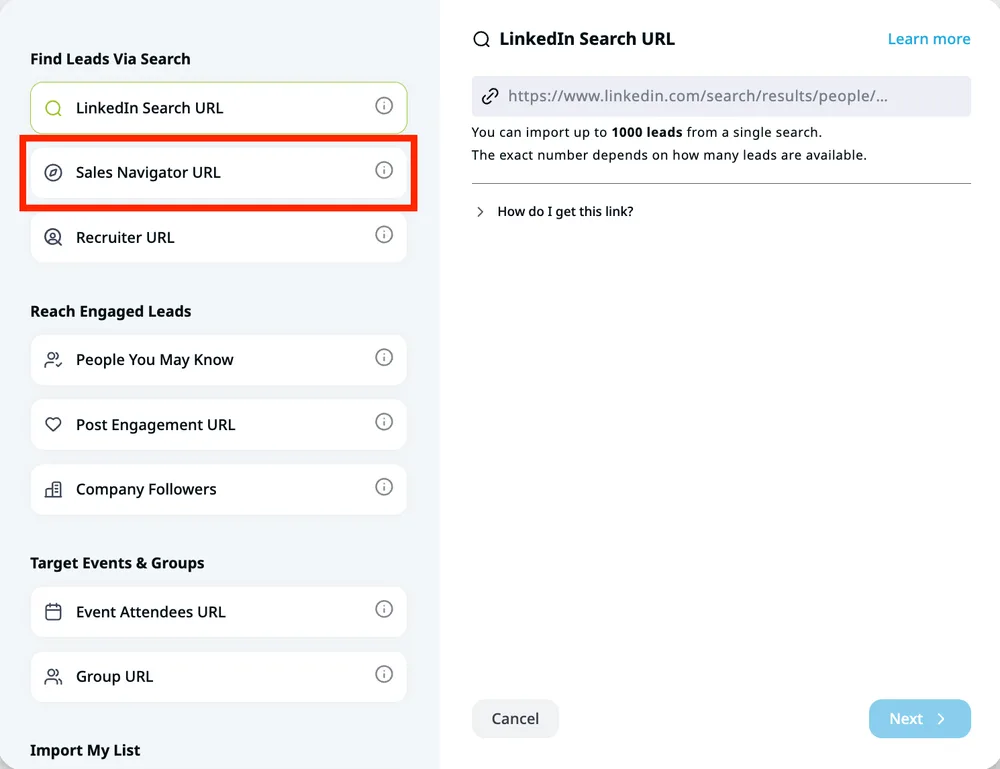
Leads come in as lists. In the new-list screen you'll see the sources side by side, and each one saves as a list any campaign can use. Recruiter URLs, Lite and Pro, are a first-class list too.
People you may know pulls up to 1,000 at a go, which is a handy extra. Company followers works on your own page only, and a Sales Navigator list needs a license on that account. That's a wide choice, and you can mix sources across campaigns. You can pull leads from:
- A search URL from LinkedIn, Sales Navigator or Recruiter
- People you may know and your company page's followers
- Post engagement, groups and event attendees
- A CSV file of LinkedIn profile URLs
The Builder and its conditions
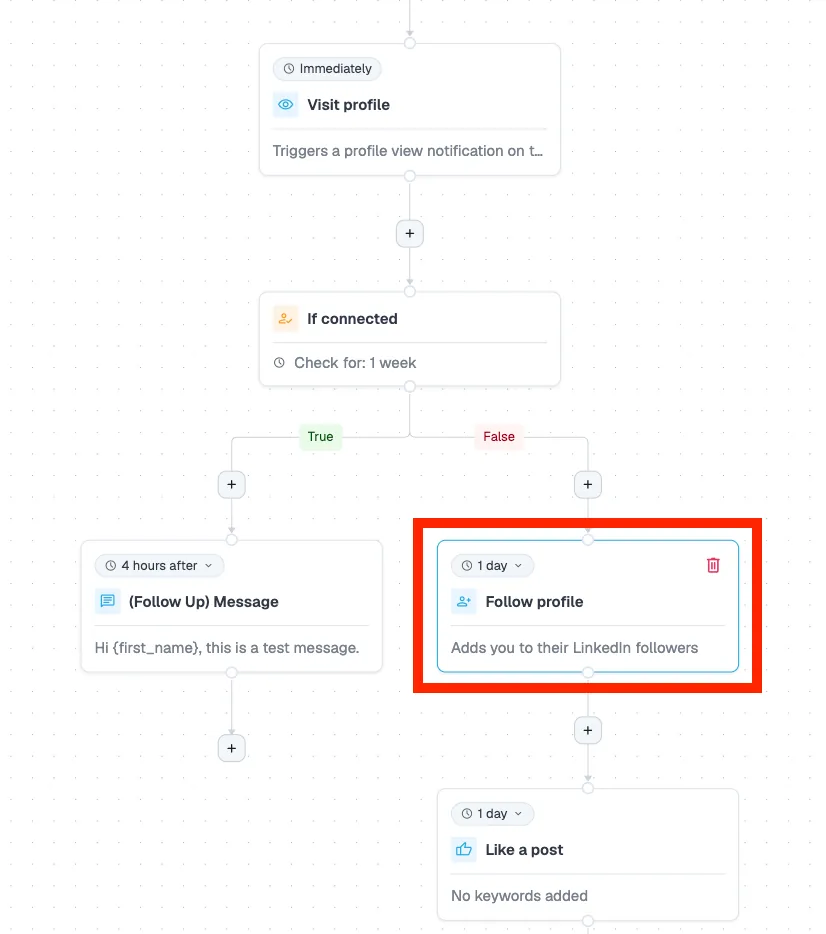
Creating a campaign starts with a picker of campaign types, from a basic Connector to the Builder. Messenger, Open InMail, group messages and event invites sit in between. The Builder is the most advanced, with conditions and integrations built in.
It's a canvas: an action palette sits on one side and your flow in the middle. The palette is deep, with likes, follows, email, webhooks and paid InMail next to the usual visits, invitations and follow-ups. It's powerful, but not intuitive, and I kept a help-center tab open the whole time.
A condition splits leads into two paths, such as connected or not. You can react with If connected, If open profile, If post liked and If visited your profile, plus an ICP filter and a custom condition with several paths. Those conditions give you real depth, and templates are unlimited.
Signals is the newer step, and I liked the idea: it pulls in people who engaged with your posts or visited your profile or company page. It has to sit first, straight after Start, and the visitor options need Premium or Sales Navigator. New people sync about once a day, so I built a test campaign and nothing arrived until the next day.
Once a campaign is live, you can't add or remove a step, only change delays and message text. To fix a flow, I had to duplicate the campaign and start the leads again. So build the whole flow before you launch.
Expandi allows 15 active campaigns per account, with up to 5,000 leads in each. Campaign prioritization points your daily limits at the campaigns that produce replies, and LinkedIn's connection limits set the real ceiling anyway.
2. A/B testing, personalization and the AI Analyzer
A/B tests in Expandi work at the campaign level. You build each version as its own campaign, and Expandi splits one lead list evenly between them. That suits a test of two whole flows, but it's clunky for one changed line.
Messages take dynamic placeholders, such as a first name or a company. Image and GIF personalization runs through Hyperise, and video through Sendspark, both third-party tools.
The AI Analyzer drafts messages and replies from a goal you write once, in a few short fields. It also tags each reply as interested, maybe or not interested, which saves triage time, but only in English.
Each account gets 15 message credits and 20 reply credits a day, and a draft costs one credit. Using it was fiddly, though: the first two goal fields stop at 60 characters, and a draft vanished when I switched tabs.
3. The Global Inbox
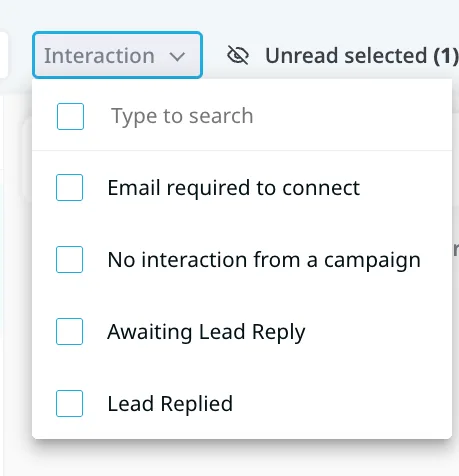
Replies from every account in a workspace land in the Global Inbox, newest first, with timestamps and message snippets. Filters cover company, account, status, read or unread, and interaction.
I filtered by account and then by status to find a single thread. The Interaction filter is the quickest way to see who replied and who you're still waiting on. Honestly, the filters make a busy inbox easy to scan.
You can pause or resume a campaign, move a lead to another campaign and mark a chat unread from the same screen. Sentiment tags and AI replies show up here too, which is handy.
Workspace admins and members get full access to the inbox, replies included. So a teammate can cover your conversations while you're away.
4. Teams, clients and integrations
Teammates and clients join a workspace for free, on any plan. You can limit a company manager to their companies and an account manager to their accounts, while admins and members see everything. The workspace analytics page filters results by client.
I opened the Integrations action and found the connector list, so you can sync HubSpot, Pipedrive or Salesforce without leaving the builder. A Webhook action sends events to any tool that can receive them, and Expandi also issues API keys for custom setups.
Expandi's MCP server, still labeled beta, works on any paid subscription. It connects Claude, ChatGPT or another MCP client to your account, to build lead lists and draft campaigns and replies. Nothing sends until you approve it.
For an in-house team, that's a full kit. For an agency, white-label and client reports wait on the Agency plan.
Is Expandi safe?
Expandi's site calls it "the safest LinkedIn automation software on the market." Its help center says everyone gets "their personal dedicated IP address" in a country you pick, and that it "is provided by a data center."
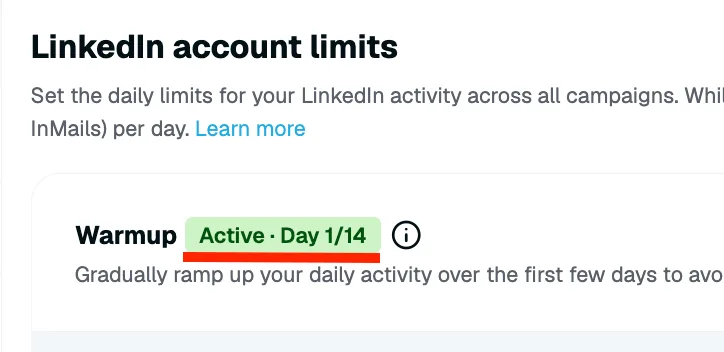
A gradual warm-up starts a new account at 5 actions a day and adds 3 every two days, up to 21. Daily limits are set as ranges, or with a Safe Preset, on the account's limits page.
The ranges are a good touch, because the account never sends the same count two days running. The Safe Preset is a handy starting point if you're new to automation.
Some users still report restrictions. One Trustpilot reviewer wrote in June 2026: "Within one and a half month our account got restricted and linkedin said 'The access to this account will remain restricted'."
Account risk comes with any LinkedIn automation tool. My advice: start below any vendor's default, and if LinkedIn does restrict you, our guide to a restricted LinkedIn account shows what to do in the first hour.
Expandi pricing
Expandi publishes one price, and each LinkedIn account needs its own seat:
| Plan | Price | Included |
|---|---|---|
| Business | $99 per LinkedIn account a month | Proxy, warm-up, Global Inbox, integrations |
| Agency | Custom quote | From 10 accounts: white-label, client reports |
The seven-day free trial asks for a card. When I signed up in August 2026, nothing mentioned one until I added a LinkedIn account, and then a Stripe checkout opened. Unless you cancel first, Expandi's terms say "the applicable subscription will automatically commence."
One Trustpilot reviewer described the result in July 2025: "…$99 was charged – without me actually using the service." If you try it, set a reminder for day six.
Business charges the same rate per account from the first account to the ninth. It also leaves out image, GIF and video personalization, since Hyperise and Sendspark are billed separately.
Sales Navigator lists and paid InMail steps both need a Sales Navigator seat, so budget its cost for each account.
Our Expandi pricing breakdown covers yearly billing, refunds and what each added account costs.
Is Expandi right for you?
Expandi suits a team under 10 accounts that wants email and CRM steps in one sequence and has time to learn a busy builder. Look elsewhere if you want:
- A dedicated residential proxy, not a data-center IP
- A free trial without a card
- Published discounts as you add accounts
- A simpler builder to learn
Replygrow: a more cost-effective Expandi alternative
If you want safer accounts, more replies and a lower bill than Expandi, Replygrow is the tool we built for that.
- A lower price: $79 per account a month, against $99 on Expandi Business. Expandi publishes no volume discount.
- Discounts as you grow: five accounts cost $375 a month, against $495. Up to 50% off at 50, with no sales call.
- Every feature, one plan: five lead sources, one inbox for all accounts, spintax and IF/ELSE personalization, and A/B tests.
- Safer accounts: a dedicated residential proxy instead of a data-center IP, plus a 14-day warm-up from 5 to 30 invitations a day on every account. Restrictions can happen with any tool, but they're rare.
- More replies: on Replygrow, teams see a 15–35% higher response rate and 3x more meetings booked weekly.
- Easy to start: try it free for 7 days with no card, and launch your first campaign today.
One Replygrow plan covers every feature at any size, and our pricing page lists every rate.
Other Expandi competitors
Still comparing? These three are the ones to check next:
Or compare them all at once in our LinkedIn automation comparisons.
Expandi review verdict: is it worth it in 2026?
Our score
3/5
Expandi's trial takes a card, its IP comes from a data center, and its published price stops before 10 accounts.
Expandi is a capable cloud tool with a real warm-up, but its trial takes your card and its published price stops at nine accounts.
Here's where this Expandi review lands: the builder is deep but slow to learn, and the IP comes from a data center. Expandi's builder sent me back to the help center all week. In Replygrow, you paste a search URL, preview every message and launch.
Replygrow takes the lead with a dedicated residential proxy instead of a data-center IP, a rate that starts lower and drops as you grow, and a 7-day trial with no card.
Frequently Asked Questions
1) What is Expandi, and is it legit?
Expandi is a cloud LinkedIn automation tool that sends profile visits, invitations, messages and InMails for you in a campaign. It's an established, legit tool, rated 4.4 from 235 reviews on Trustpilot.
2) How does Expandi work?
You connect a LinkedIn account, build a lead list from a search URL, a post or a CSV, and pick a campaign type. Then you set the steps, delays and daily limits, and Expandi runs the campaign on its servers.
3) How much does Expandi cost?
Expandi costs $99 per LinkedIn account a month on Business. From 10 accounts, Agency is priced after a sales call.
4) Is Expandi free?
No. Expandi has no free plan, and its seven-day trial asks for a card. Unless you cancel before the trial ends, the subscription starts and you're charged.
5) Is Expandi safe to use?
No LinkedIn automation tool is free of account risk, and Expandi is no exception. It gives each account a data-center IP, a 14-day warm-up and daily limit ranges, yet some users report restricted accounts.
6) What are the best Expandi alternatives?
Try Replygrow first, the tool we built: a dedicated residential proxy instead of a data-center IP, a rate that starts lower and drops as you add accounts, and a 7-day trial with no card. HeyReach, Dripify and Waalaxy are the next ones to check.
7) Expandi vs Replygrow: what's the difference?
Expandi bills the same rate for every account and gives each account a data-center IP. Replygrow gives every account a dedicated residential proxy, costs less from the first account, publishes discounts up to 50%, and its trial takes no card.
Get 3x more replieson LinkedIn
Set up in minutes. 7-day free trial, no credit card.
Try Replygrow free