
La Growth Machine Review 2026: Features, Pros & Cons

Is La Growth Machine right if LinkedIn is your main channel? This La Growth Machine review covers its builder, its plans and its gaps.
I started its 14-day trial on September 30, 2026, and took it from the first audience to replies in the inbox. Then I went through user reviews on G2, Capterra and Trustpilot.
La Growth Machine, also written LaGrowthMachine or LGM, comes from a French company. It's for sales teams and founders weighing it against other LinkedIn automation tools.
La Growth Machine at a glance
La Growth Machine is a cloud sales platform. You build one sequence across LinkedIn, email and calls, with X on its top plan, and it keeps running with the laptop closed.
Email enrichment, a company database, an AI reply agent and CRM sync sit next to LinkedIn, which is one channel of several.
My first impression was an app that does a lot, with an interface that feels a bit dated. Once you learn it, you'll find the builder very flexible.
| Verdict | La Growth Machine |
|---|---|
| Price | $135/identity/month on Pro |
| Best for | LinkedIn, email and calls together |
| Integrations | HubSpot, Pipedrive; Salesforce via Zapier |
La Growth Machine pros and cons
| Pros | Cons |
|---|---|
| The most flexible multichannel builder I've tested, with branches and conditions | Basic leaves out the inbox, A/B tests and the custom builder |
| AI that pre-writes your template messages | Every identity costs the full rate, with no published volume discount |
| AI voice notes on LinkedIn, in your own voice | An advanced setup that starts from a template |
| Email enrichment and a company database built in | Some users report bugs, sync errors and logouts |
| Fast, friendly support in recent reviews | A full sales platform, so LinkedIn-only teams pay for channels they skip |
La Growth Machine feature overview
The rest of this La Growth Machine review starts where the trial does, with an audience and a campaign. Then come the messages, the inbox and the rest of the platform.
1. Audiences, campaigns and the sequence builder
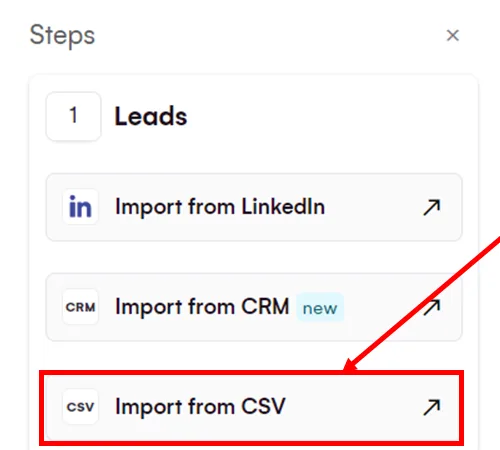
The trial starts with an audience, so that's where I began. I set one up, enriched the emails and imported a list of our own leads.
Enrichment runs a waterfall of email providers and verifiers, tried in turn until one finds a verified work email. Each plan includes a monthly allowance of enriched leads, and you can buy extra credits. That's its strongest case, since you skip a separate enrichment subscription.
A company database helps you build account-based lists. On Pro, lookalikes come from the leads who answered you, and the pricing page promises "Get 50+ leads for each positive reply".
Duplicates merge on import, and leads you've already contacted are skipped by default. So two campaigns don't double up on one person.
Their help center keeps each campaign's audience "under 500-600 leads per campaign", so you split a bigger search into several audiences. You can pull leads from:
- A LinkedIn or Sales Navigator search or list URL, on every plan
- Post likers, commenters, event attendees and company followers, on Pro
- A CSV file, or a CRM list on Ultimate
- A Chrome extension in beta, one lead at a time
The sequence builder and conditions
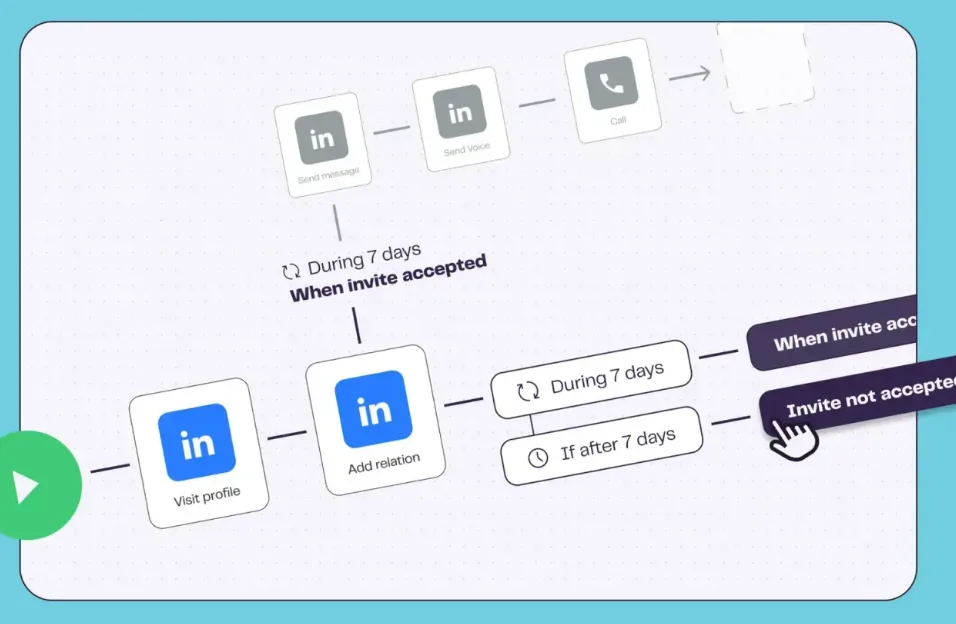
Then the campaign, and here La Growth Machine makes you start from a template. I picked a multistep flow of predefined steps, then added the messages and worked through the settings.
The part I liked most was the AI. It reads your goal and pre-writes the template's texts. My messages came pre-written, ready to edit.
Steps cover profile visits, invitations, messages and voice notes on LinkedIn, plus emails and webhooks. Calls, manual tasks, likes and follows wait for Pro, and X steps for Ultimate. Messages and voice notes go only to first-degree connections, so they wait for the acceptance.
Conditions split the path. Did the lead accept, reply, open the email or visit you back? Each answer can send them down a different branch, so the campaign grows into a tree of tasks.
I found it a bit advanced, and it isn't easy to set up if you're not experienced. The tree you build is flexible, though. One G2 reviewer put it this way: "The sequence builder has a learning curve, but it is amazingly flexible."
Building your own sequence from a blank canvas takes Pro. On Basic, every campaign runs on a template that already carries its conditions, and you edit the messages and delays inside it.
Plan the structure before you launch. Their help center says "changing the structure of a block will often cause the campaign to stop", though copy edits are safe. One Trustpilot reviewer went further in May 2026: "Editing campaign = silently dropping all your campaign progress".
2. Voice notes, A/B tests and personalization
I liked the voice notes too. You type an intro with the first-name variable, and the AI reads it in your own voice. Then you record the rest once, and every lead gets the two joined up.
Voice notes come with every plan and run a minute at most. One G2 reviewer singles out the "voice messages on LinkedIn with IA" in January 2026.
On Pro, you can A/B test a message, an email or an invite note, with two versions of the step in one campaign. Real chat mode, also on Pro, sends one message as up to six short bubbles.
Spintax, which the help center calls spins, varies your wording from lead to lead. Save & Preview shows whether your variables match each lead's details before anything goes out.
Social warming, on Pro, likes a lead's posts, follows them and visits the profile before the invite goes out. It's worth switching on for your cold lists.
3. The unified inbox
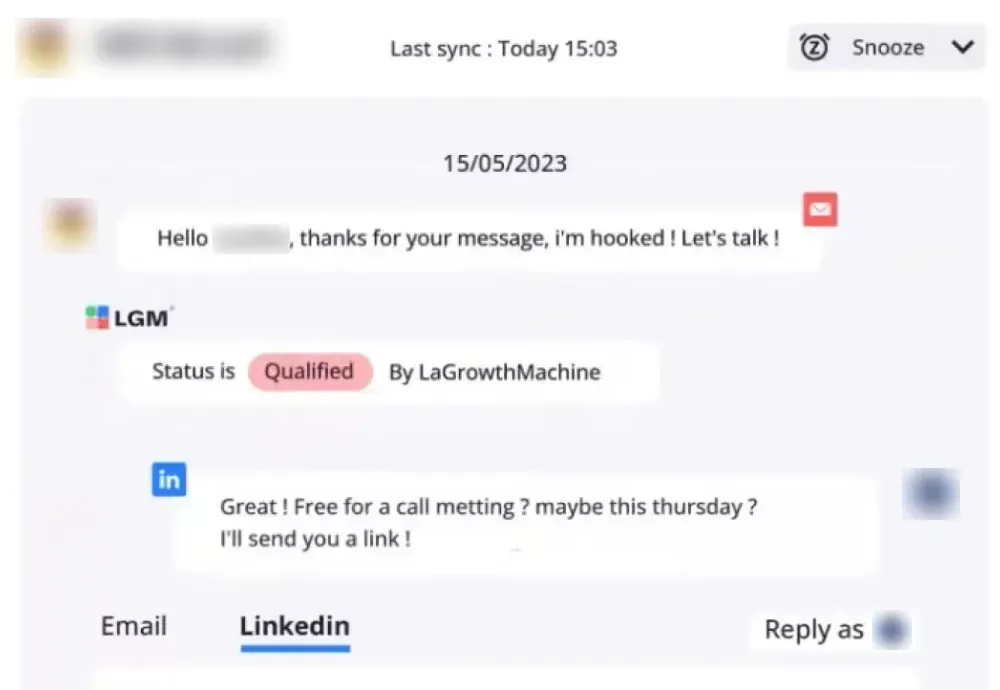
Replies land in the unified inbox, and that's where I followed up during the trial. A lead's LinkedIn messages and emails sit in one thread. It starts on Pro, and Basic doesn't include it.
Your teammates are free, and they can reply under any identity. There are no permission controls, though, so every member sees every conversation in the workspace.
Out-of-office replies are caught, and the lead comes back three days after their return date. A Reply Agent, in beta and rolling out to Pro and Ultimate, follows up on the LinkedIn replies worth exploring.
Some users report bugs and logouts. One G2 reviewer wrote in January 2026: "They usually solve them quickly, but audiences and accounts often run into problems, like being logged out." Support gets mostly praise, like a Trustpilot reviewer's "Very great customer support, almost instant every time i had something not clear."
4. Identities, email, calls and integrations
Each identity takes a LinkedIn account, a Google mailbox and an X account. I gave mine its own daily limits and working hours before the first campaign. Keep yours under LinkedIn's connection limits, since each identity carries its own risk.
From Pro, one identity can hold several mailboxes, with sends rotated between them for deliverability. There's no email warm-up built in. Their help center points you to MailWarm or MailReach, or about three weeks of warming by hand.
Some users report delivery trouble. One Trustpilot reviewer wrote in July 2025: "E-Mailing very ineffective and bug prone (we received our own emails in spam folder)".
Calls are tasks. When a lead reaches a call step, only that lead waits until you log the call, and the rest of the campaign keeps running. X campaigns sit on Ultimate, and X replies don't reach the inbox.
Agencies get a workspace per client on every paid plan, each with its own members, identities, campaigns and stats. Your clients see the La Growth Machine brand, since there's no white-label.
The API, webhooks, Zapier, Make and Clay start on Pro. Native HubSpot and Pipedrive sync is Ultimate only, and Salesforce runs through Zapier.
That's a lot of platform to pay for. If LinkedIn is where your replies come from, you're paying for channels you won't open.
Is La Growth Machine safe?
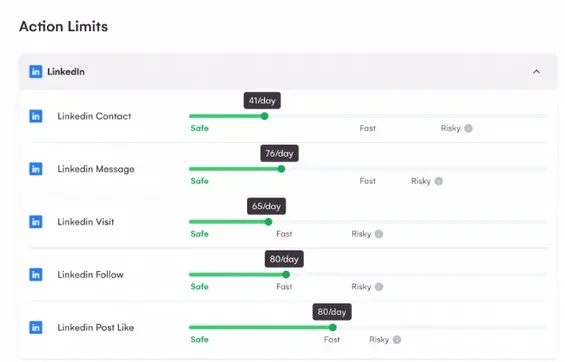
La Growth Machine's safety page calls the tool "100% powered by the Cloud" and says "each of our users gets a dedicated IP". It adds that "Our 5G proxies use real mobile connections to mask your IP address".
Their help center recommends up to 80 invitations, 80 profile visits and 120 messages a day. You set those caps yourself on each identity, as I did in the trial, and "They're not quotas, they're upper limits".
A new identity gets no automatic ramp, so you raise its limits by hand. The help center suggests starting at half the cap and climbing ten at a time.
Some users report the tool sending less than they set. One Capterra reviewer wrote in December 2024: "I was scheduling 30 messages a day and only 12-13 were being sent".
There's some account risk with any LinkedIn automation tool. If LinkedIn does restrict an identity, our guide to a restricted LinkedIn account explains the first hour.
La Growth Machine pricing
La Growth Machine bills per identity, the profile that runs your campaigns. Teammates are free and reply without one. Three plans carry a public price:
| Plan | Price | Included |
|---|---|---|
| Basic | $70 per identity a month | LinkedIn and email, up to three identities |
| Pro | $135 per identity a month | Inbox, A/B tests, custom builder, calls, API |
| Ultimate | $195 per identity a month | Pro plus X, HubSpot and Pipedrive sync |
Agency and Custom plans are quoted by sales. The pricing page opens in euros, so switch it to dollars and Monthly to match these figures.
The catch is Basic. It stops at three identities and leaves out the inbox, A/B tests and the custom builder, so most teams land on Pro.
The 14-day free trial asks for no card and runs on one identity. The pricing FAQ says it covers everything "except for custom sequences", and that matches what I saw: every campaign started from a template. If you want a blank canvas, ask support in the chat on day one.
Sales Navigator leads cost extra too: add its cost for each identity.
Yearly billing, enrichment credits and the cost as you add identities are in our La Growth Machine pricing breakdown.
Is La Growth Machine right for you?
La Growth Machine is more a complete sales platform than a LinkedIn tool. It suits a team that truly runs LinkedIn, email and calls together, wants enrichment in the same app and has someone to own the builder. Look elsewhere if you want:
- A tool focused on LinkedIn outreach
- One inbox and A/B tests on your first plan
- A setup you can learn without a manual
- A rate that drops as you add accounts
Replygrow: a LinkedIn-focused La Growth Machine alternative
If you want a tool focused on LinkedIn outreach, with every feature on one plan and safer accounts, Replygrow is the tool we built for that.
- A lower price than Pro: $79 per account a month, against $135 per identity on La Growth Machine Pro.
- Discounts as you grow: five accounts cost $375 a month, against $675 on Pro. Up to 50% off at 50. La Growth Machine publishes no volume discount.
- Every feature, one plan: five lead sources, one inbox for all your accounts, A/B tests and a company per client.
- Safer accounts: a dedicated residential proxy per account and a 14-day warm-up from 5 to 30 invitations a day. Restrictions are rare, and no tool can fully rule them out.
- More replies: with Replygrow, teams see a 15–35% higher response rate and 3x more meetings booked weekly.
- Easy to start: 7 days free with no card, and a first campaign that runs today.
Run the same LinkedIn campaign in both, and Replygrow takes less setup and fewer settings to check. Rates for every size sit on our pricing page.
Other La Growth Machine competitors
For a wider comparison, look at these three:
- HeyReach, for agencies
- Meet Alfred, for multichannel outreach
- Dripify, for small teams
- Expandi, Waalaxy and Linked Helper deserve a look as well
Prefer a grid? Our LinkedIn automation comparisons lay them side by side.
La Growth Machine review verdict: is it worth it in 2026?
Our score
3.5/5
La Growth Machine's inbox and A/B tests cost Pro rates per identity, a new identity gets no automatic ramp, and the setup takes work.
La Growth Machine is a flexible tool, but it's more a complete sales platform than a LinkedIn outreach tool.
The core of my La Growth Machine review: the builder is the most flexible I've run, but you pay Pro rates per identity for the inbox and A/B tests, and you'll put real time into the setup.
Replygrow takes the lead for LinkedIn outreach. You get every feature on one plan, a 14-day warm-up that ramps each new identity for you, and a lower rate than Pro that drops as you add accounts.
Frequently Asked Questions
1) What is La Growth Machine used for?
La Growth Machine runs LinkedIn, email and call steps in one sequence, with email enrichment and a company database built in.
2) Is La Growth Machine legit?
Yes. B3 SAS, a French company, makes it. Its data agreement says "All servers are located in the EU in order to be fully GDPR compliant." It's rated 4.4 from 36 reviews on Trustpilot.
3) How much does La Growth Machine cost?
Pro, the plan with the inbox and A/B tests, costs $135 per identity a month. Basic is $70 and stops at three identities, and Ultimate is $195. Teammates are free.
4) Does La Growth Machine have a free trial?
Yes: 14 days with no card, on one identity. It covers every feature except custom sequences, so in our trial every campaign started from a template.
5) Is LGM safe for LinkedIn?
Like every LinkedIn automation tool, La Growth Machine carries some account risk. It gives each user a dedicated IP and 5G mobile proxies and publishes daily limits, but a new identity gets no automatic ramp, and some users report sends falling short.
6) What are the best La Growth Machine alternatives?
If LinkedIn is your main channel, start with Replygrow, the tool we built: every feature on one plan, a 14-day warm-up for each new identity, and a lower rate than Pro that drops as you add accounts. Compare HeyReach, Meet Alfred and Dripify as well.
7) La Growth Machine vs Replygrow: what's the difference?
La Growth Machine prices per identity, with the inbox, A/B tests and custom builder on Pro. Replygrow is built for LinkedIn outreach. It puts every feature on every account, with one inbox and an automatic warm-up, for less than Pro, and publishes discounts up to 50% as you add accounts.
Get 3x more replieson LinkedIn
Set up in minutes. 7-day free trial, no credit card.
Try Replygrow free