
Meet Alfred Review 2026: Features, Pros & Cons, Verdict

This Meet Alfred review covers its LinkedIn features, its other channels and where it falls short.
I tried it myself in September 2026 and ran one campaign. Meet Alfred now advertises a 7-day trial; mine ran 14 days. Reviews on G2 and Trustpilot filled in the rest.
It's for sales reps, recruiters and agencies weighing Meet Alfred, or MeetAlfred as its domain spells it, against other LinkedIn automation tools.
Meet Alfred at a glance
Meet Alfred is a cloud sales automation tool with LinkedIn at its center. You build a sequence of LinkedIn steps, and on its Business plan you can add email and X steps too.
Campaigns run on its servers, so your outreach keeps going with the laptop closed. You connect with your LinkedIn login, and one seat holds one LinkedIn account.
My first impression: it's a multichannel sales platform, and LinkedIn is one channel of several. Honestly, the interface feels dated.
| Verdict | Meet Alfred |
|---|---|
| Price | $99/seat/month on Business |
| Best for | Sellers mixing LinkedIn and email |
| Integrations | HubSpot, Salesforce, Zapier, webhooks |
Meet Alfred pros and cons
| Pros | Cons |
|---|---|
| LinkedIn and email steps in one sequence | LinkedIn is one channel of several; X campaigns failed in my trial |
| A free trial with no card that runs a real campaign | A dated interface that takes a while to learn |
| Automated greetings for birthdays and job changes | Sales Navigator, InMail and CSV campaigns need Business |
| Warm-up steps before the invitation: a profile view, a follow and a like | The team inbox and white label need three Teams seats |
| White label with your own login domain on Teams | Some users report disconnections and restrictions |
Meet Alfred feature overview
The rest of this Meet Alfred review walks the app in setup order: leads and a sequence first, then the other channels, the inbox and the features for teams.
1. LinkedIn campaigns and the sequence builder
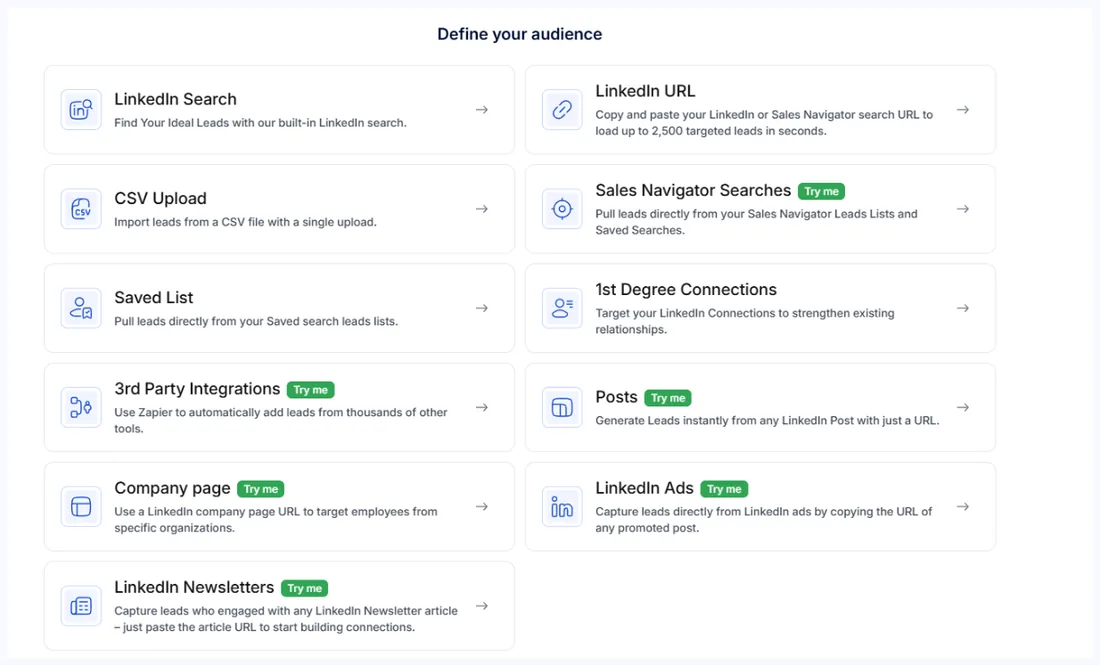
You connect your LinkedIn account with your email, password and country. Then you open Create Campaign, pick LinkedIn Campaign and choose your audience. Launching my first campaign took under 15 minutes.
My trial allowed one campaign and offered nine ways to start it, so choose your source carefully. For a list of event attendees, you upload a CSV with the profile URLs in column A, then remove the duplicates and filter out profiles without photos.
Each source has its own ceiling. A CSV takes up to 5,000 leads, a LinkedIn search 1,000 and a Sales Navigator search 2,500, so for a big audience you split the search into several lists.
Save yourself some time: pick Business, not Individual. Individual runs only on free and Premium LinkedIn accounts, so Sales Navigator, InMail and CSV campaigns all start on Business. Group, event, post, company and newsletter campaigns wait for it too.
Then there's the Lead Finder, listed as Finder in the menu. You search LinkedIn by job title, industry, location and company size, and the result cap grows with your plan. In my September trial it was marked beta, and to me it felt like a basic LinkedIn search.
On a paid plan, the LinkedIn campaign screen lists eleven sources. You can pull leads from:
- A LinkedIn or Sales Navigator search, or a saved Sales Navigator list
- A CSV of profile URLs, or a list you saved earlier
- Your own first-degree connections
- A post, a company page, a LinkedIn ad or a newsletter
- Leads sent in from Zapier, Make or a webhook
The sequence builder
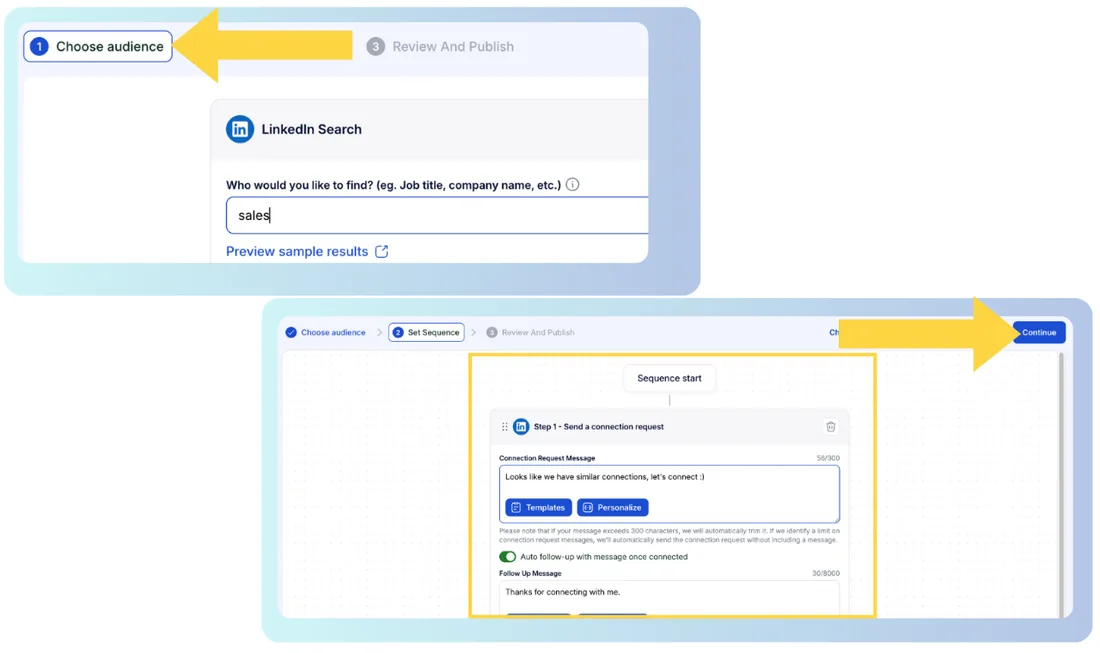
You build the sequence one step at a time, and it reads top to bottom. You can warm each lead up first with a profile view, a follow and a like, then send a connection request and a message.
A step after a connection request waits for the acceptance. Your follow-up goes out about 15 minutes after someone accepts, and you can chain more messages after it. Endorsing skills works only once the lead is a first-degree connection.
InMail is a step too. By default it writes only to Open Profiles and first-degree connections. Spending your InMail credits is a switch on the step, off until you turn it on, and Individual doesn't have it.
Templates take snippets such as first name, company and position. Check for leads with no first name before you launch, or the snippet can go out empty.
Get the step order right first, too. Once a campaign is live, you can edit messages and delays and add steps, but you can't reorder or remove them.
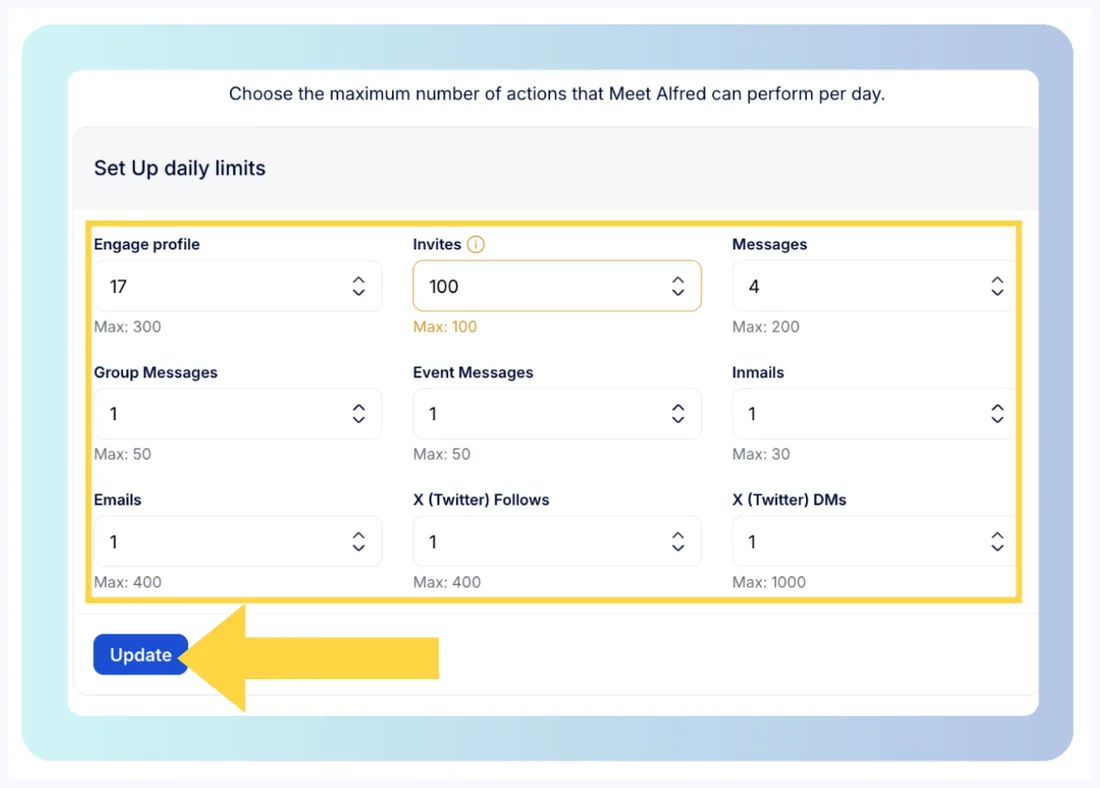
You set working hours and daily limits per account, under LinkedIn's connection limits. Auto-withdrawal in Settings clears stale invitations after seven to ninety days, so switch it on before your first send.
The screens are dense, and the toolbar did nothing until I picked a sub-option. One Trustpilot reviewer put it plainly in August 2026: "The UX is difficult, but not a complete dealbreaker."
2. Multichannel: email, X and social posts
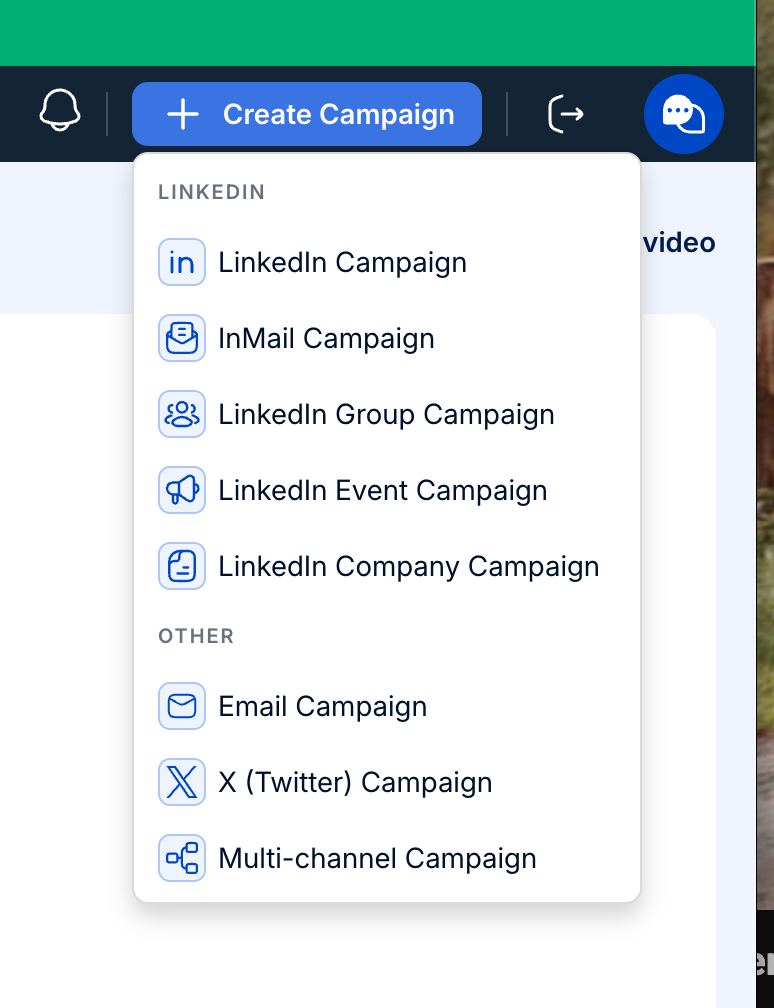
This is where Meet Alfred spends its effort. The Create Campaign menu lists LinkedIn, InMail, group, event and company campaigns, then email, X and multichannel ones. You choose the channel when you create the campaign.
Email steps start on Business, and you connect a Gmail, Outlook or Google Workspace mailbox. The help center advises you to stay under 100 emails a day for the first few weeks. Even so, some users report blocked emails.
Here's the catch: in my trial, X campaigns didn't work. The pricing page and the Create menu sell X, yet Meet Alfred's help center says X campaigns are "currently under maintenance", in an article dated August 19, 2026.
You can schedule posts to LinkedIn, Facebook, X and Instagram from the same app. What I missed was LinkedIn depth, since the tool spreads its effort across every channel.
Some users report campaigns that stall. One Trustpilot reviewer wrote in October 2025 that "the programme has now failed to send Step 3 campaign messages for 12 days."
3. Inbox, CRM and greetings
The smart inbox comes with every plan, one inbox per LinkedIn account. You'll find LinkedIn, InMail and Sales Navigator messages in one view, with search, filters for tagged, archived and unread chats, and the lead's profile beside the thread.
When someone replies, the campaign pauses for that contact. Reply to a test message in the trial and you'll see it happen.
The built-in CRM is light: tags, notes and exports. You tag leads from the Tag Manager, and an Excluded list keeps people out of every campaign.
Reaching a teammate's inbox is a Teams feature. An owner or admin impersonates the account and replies from it, and Teams starts at three seats.
Support splits opinion. Meet Alfred's homepage promises "24/7 customer support, with an average response time of under 3 minutes," and one reviewer calls the chat "great and very helpful." Another wrote in August 2026: "Platform is fine, customer service is terrible."
Automated greetings
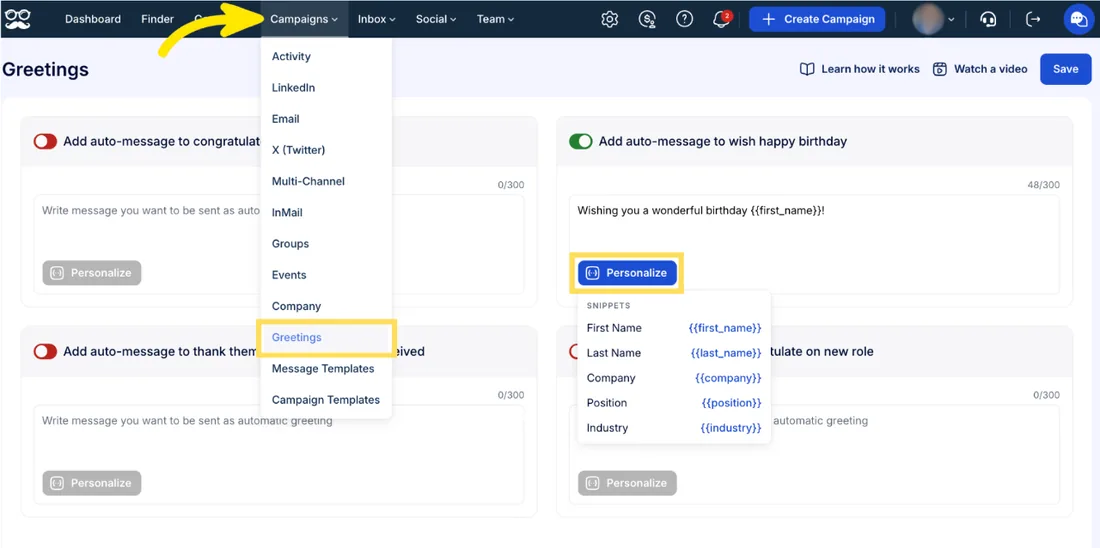
On the greetings screen, birthdays, job changes and work anniversaries get a message on their own, and endorsements get a thank-you, on every plan. You write each message once and drop in snippets like a first name. I liked this one.
4. Teams, white label and integrations
Teams adds roles, groups, team analytics and impersonation, and it starts at three seats. Groups sort accounts by client or team, and one seat still holds one LinkedIn account.
White label sits on Teams too. You get your logo, your colors and a login on your own domain, which support switches on with a CNAME record. X, Facebook and Zapier logins don't work from that domain, though.
Its agencies page pitches separate sequences for every client from one dashboard, plus client-branded reports you export. Test the team features in the trial before you buy three Teams seats.
On the integrations screen, Teams exports contacts to HubSpot and Salesforce, one way, with seven fields. Zapier, Make and webhooks start on Business, and an API key opens eight actions. One G2 reviewer notes "minor delays in syncing interaction data with our internal CRM."
For a team of three or more, that's a full kit. For one or two accounts, the team tools mean paying for three seats.
Is Meet Alfred safe?
Meet Alfred's help center says "Meet Alfred is safe since Meet Alfred is a cloud-based app that they cannot detect, unlike chrome extensions." A vendor article goes further: its technology "allows it to work around LinkedIn's policies and terms of service."
Its numbers don't agree with each other. Its AI-settings page says it can "safely send up to 100 connection requests per day," while its restriction article names a "weekly limit of 100 invites."
Each account gets a dedicated IP, and you can add your own proxy. You set daily limits and working hours per account, and the help center's warm-up is advice you follow by hand: three or four working hours a day for two or three weeks, then build up.
Some users report trouble. One Trustpilot reviewer wrote in May 2024: "Besides disconnecting, Linkedin blocked me several times." Others describe disconnections from LinkedIn, mostly in 2023 and 2024.
No LinkedIn automation tool is risk-free. On Teams, switch on Verify on the Fly under Team, then Permissions: it emails you a code to reconnect an account, and it's off by default. If an account does get restricted, our guide to a restricted LinkedIn account walks through the first hour.
Meet Alfred pricing
Meet Alfred sells its plans per seat, and one seat holds one LinkedIn account. Unlimited is by quote, with volume pricing and a success manager for large teams. The other plans, at the monthly rate:
| Plan | Price | Included |
|---|---|---|
| Individual | $59 per seat a month | Free and Premium LinkedIn accounts only |
| Teams | $79 per seat a month | Business plus team tools, from three seats |
| Business | $99 per seat a month | Most popular: Sales Navigator, InMail, CSV, email |
Meet Alfred now advertises a 7-day free trial with no card, and mine, in September 2026, ran 14 days. When it ends, your campaigns pause until you pick a plan. Upgrading doesn't restart them, so you restart each one by hand.
One warning: the pricing page opened on Annual for me. Switch it to Monthly before the prices mean anything.
The catch: Individual leaves out Sales Navigator, InMail, CSV campaigns, email and integrations. Working from Sales Navigator? Budget its cost for each account too.
Yearly billing, refunds and the cost at each team size are in our Meet Alfred pricing breakdown.
Is Meet Alfred right for you?
Meet Alfred suits a seller who wants LinkedIn and email steps in one sequence, or a team of three or more that wants white label. Look elsewhere if you want:
- A cleaner tool built around LinkedIn alone
- Every feature on your first plan
- One inbox for all your accounts from day one
- Discounts that grow with your account count
Replygrow: a LinkedIn-first Meet Alfred alternative
If you want every LinkedIn feature on one plan, safer accounts and a simpler tool than Meet Alfred, Replygrow is the tool we built for that.
- Every feature from your first account: $79 a month, where Meet Alfred charges $99 on Business until you buy three Teams seats.
- Discounts as you grow: five accounts cost $375 a month, against $395 on Teams. Up to 50% off at 50. Meet Alfred quotes volume pricing only on Unlimited.
- All of LinkedIn on one plan: each account runs Sales Navigator, Recruiter and InMail campaigns using your own Sales Navigator or Recruiter seat, plus one inbox for all accounts and A/B tests.
- Safer accounts: a dedicated residential proxy on each account, plus a 14-day warm-up from 5 to 30 invitations a day. Restrictions are rare, but no tool can promise you'll never see one.
- More replies: teams running Replygrow see a 15–35% higher response rate and 3x more meetings booked weekly.
- Easy to start: a free week with no card, and your first campaign goes out today.
With Replygrow, LinkedIn is the whole product, and the plan you start on is all of it. Our pricing page shows the rate at every size.
Other Meet Alfred competitors
Other tools worth a comparison:
- HeyReach, for agencies
- Expandi, for branching sequences
- La Growth Machine, for LinkedIn plus email
- Dripify, Waalaxy and Linked Helper are on the longer list
Or line them all up in our LinkedIn automation comparisons.
Meet Alfred review verdict: is it worth it in 2026?
Our score
3/5
Meet Alfred spreads itself across channels: X campaigns didn't work in my trial, the interface is dated, and Sales Navigator waits for Business.
Meet Alfred does a lot as a sales platform, but LinkedIn is one channel of several, and it shows.
To sum up my Meet Alfred review: the greetings and email steps are handy, but X campaigns didn't work in my trial, the interface feels dated, and Sales Navigator and the team inbox sit on higher plans.
Replygrow takes the lead with every LinkedIn feature on one plan, a dedicated residential proxy and warm-up on every account, a rate that drops as you grow, and one inbox for every account from day one.
Frequently Asked Questions
1) Is MeetAlfred legit?
Yes. MeetAlfred, as its domain spells it, is a real company. Its homepage says it was founded in 2016 and has 175,000+ registered users, and it's rated 4.3 from 939 reviews on Trustpilot.
2) How does Meet Alfred work?
You connect a LinkedIn account with your login, pick a lead source and build a sequence of steps. Meet Alfred then runs the campaign from its cloud, inside the daily limits and working hours you set.
3) How much does Meet Alfred cost?
Meet Alfred costs $59 per seat a month on Individual, $99 on Business and $79 on Teams, from three seats. Sales Navigator, InMail and CSV campaigns need Business or Teams.
4) Does Meet Alfred have a free trial?
Yes. Meet Alfred advertises a 7-day trial with no card. Mine ran 14 days in September 2026, enough to run one campaign. The pricing page lists no free plan.
5) Is Meet Alfred safe to use?
Meet Alfred shares the account risk that comes with any LinkedIn automation tool. It gives each account a dedicated IP, but its warm-up is advice you follow by hand, and some users report disconnections and restrictions.
6) What are the best Meet Alfred alternatives?
Replygrow, the tool we built, is the first one we'd point you to: every LinkedIn feature on one plan, a rate that drops as you add accounts, and one inbox for every account from day one. HeyReach, Expandi and La Growth Machine are worth comparing too.
7) Meet Alfred vs Replygrow: what's the difference?
Meet Alfred is a multichannel sales platform that splits LinkedIn features across plans, and Replygrow is built around LinkedIn on one plan. On Meet Alfred, Sales Navigator waits for Business and the team inbox for three Teams seats. Every Replygrow account runs Sales Navigator, Recruiter and InMail campaigns using your own Sales Navigator or Recruiter seat, with one inbox, a dedicated residential proxy and warm-up.
Get 3x more replieson LinkedIn
Set up in minutes. 7-day free trial, no credit card.
Try Replygrow free