
HeyReach Review 2026: Features, Pros & Cons, Verdict

Running more than a few LinkedIn accounts? This HeyReach review covers how it works, what it costs at scale and where it falls short.
I signed up in August 2026, connected three accounts, built campaigns and set up the proxies its agency plans need. After that, I went through what reviewers on G2 and Trustpilot report.
It's for agencies and sales teams weighing HeyReach against other LinkedIn automation tools.
HeyReach at a glance
HeyReach is a cloud LinkedIn outreach tool built on one idea: a campaign should send from several LinkedIn accounts at once. It calls each connected account a sender, and campaigns keep running with your laptop closed.
It's aimed at agencies and sales teams that run many accounts, with a workspace for each client and one inbox for every reply. You pay per sender, and your teammates log in free.
My first impression was an easy product to find your way around. The first screen is a dashboard of every sender's and campaign's results, which you can filter by date, campaign and sender.
| Verdict | HeyReach |
|---|---|
| Price | $79/sender/month on Growth |
| Best for | Agencies at 25+ accounts |
| Integrations | HubSpot, Attio, Clay, Zapier |
HeyReach pros and cons
| Pros | Cons |
|---|---|
| One campaign sends from several accounts and rotates between them | The agency plans make you bring your own proxies |
| One inbox holds every account's replies | Every new account is warmed up by hand |
| A workspace for each client, with a view-only client login | No spintax inside a message |
| Exclusion filters and a Blacklist keep campaigns off the same prospect | A launched campaign can't take new steps |
| Cooldown Mode and Locks slow an account down when LinkedIn pushes back | Slow support and a strict refund policy in user reviews |
One two-year customer wrote on Trustpilot in late 2025: "Sometimes, it takes 24 to 48 hours to get a response, even for urgent issues submitted through tickets."
HeyReach feature overview
The rest of this HeyReach review takes the app screen by screen: senders, leads and a sequence first, then message variations, the unibox and the features for agencies.
1. LinkedIn outreach, sender rotation and the sequence builder
After you sign up, you land on the dashboard, with campaigns and senders one click away in the sidebar. Each LinkedIn account you connect becomes a sender, and you pick its proxy country as you connect it. Beside each sender, you'll see its connection status and whether it hit its daily limits.
The core idea is sender rotation, and it's on by default once you pick a campaign's senders. I attached three senders to one campaign, and HeyReach spread the invitations between them without me touching anything. One Trustpilot reviewer calls it "the standout feature for us".
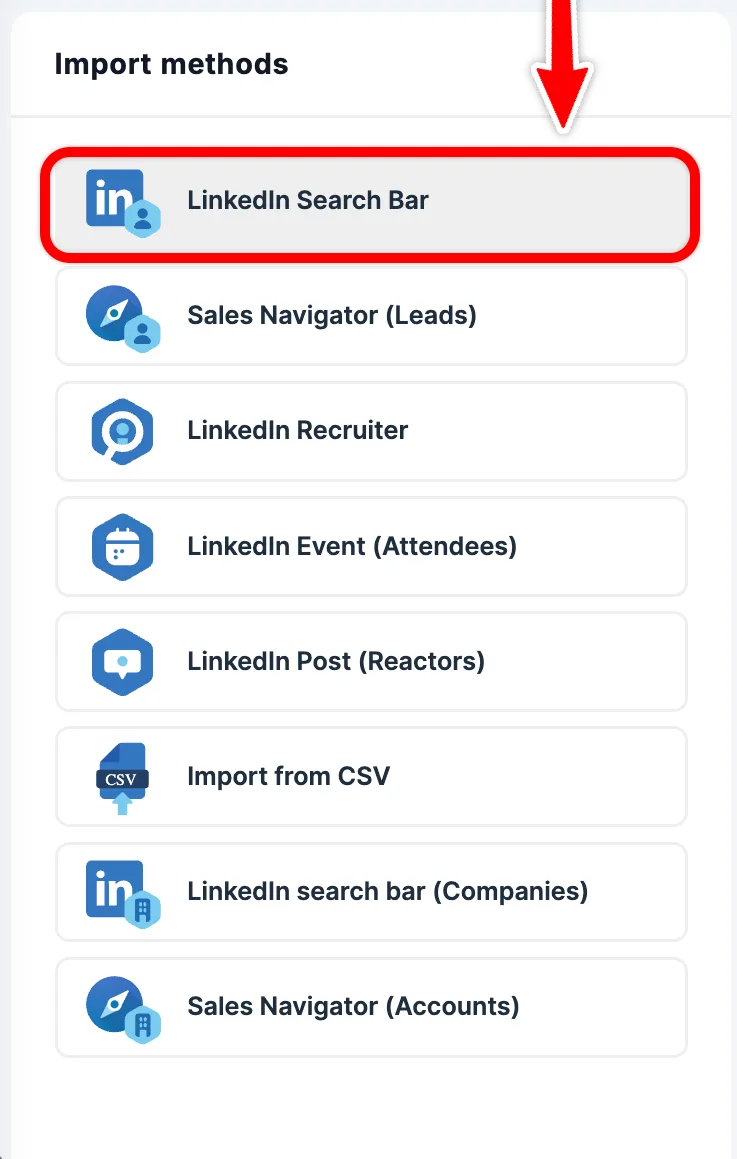
Leads come in through an import picker. I imported from a LinkedIn search, a Sales Navigator search and a CSV, and each list was ready for any campaign. Recruiter searches import the same way, which recruiting agencies will appreciate.
One Sales Navigator seat went a long way. I pulled the leads on one account and ran them on all three senders, so add what Sales Navigator costs once, not for every sender.
Size is the trap. LinkedIn shows at most 2,500 results for one Sales Navigator search, so split a bigger search by location or seniority. Then import each slice as its own list. You can pull leads from:
- A LinkedIn search URL, or one from Sales Navigator or Recruiter
- The attendees of a LinkedIn event
- The people who reacted to a post
- A CSV file, or a company search
The sequence builder
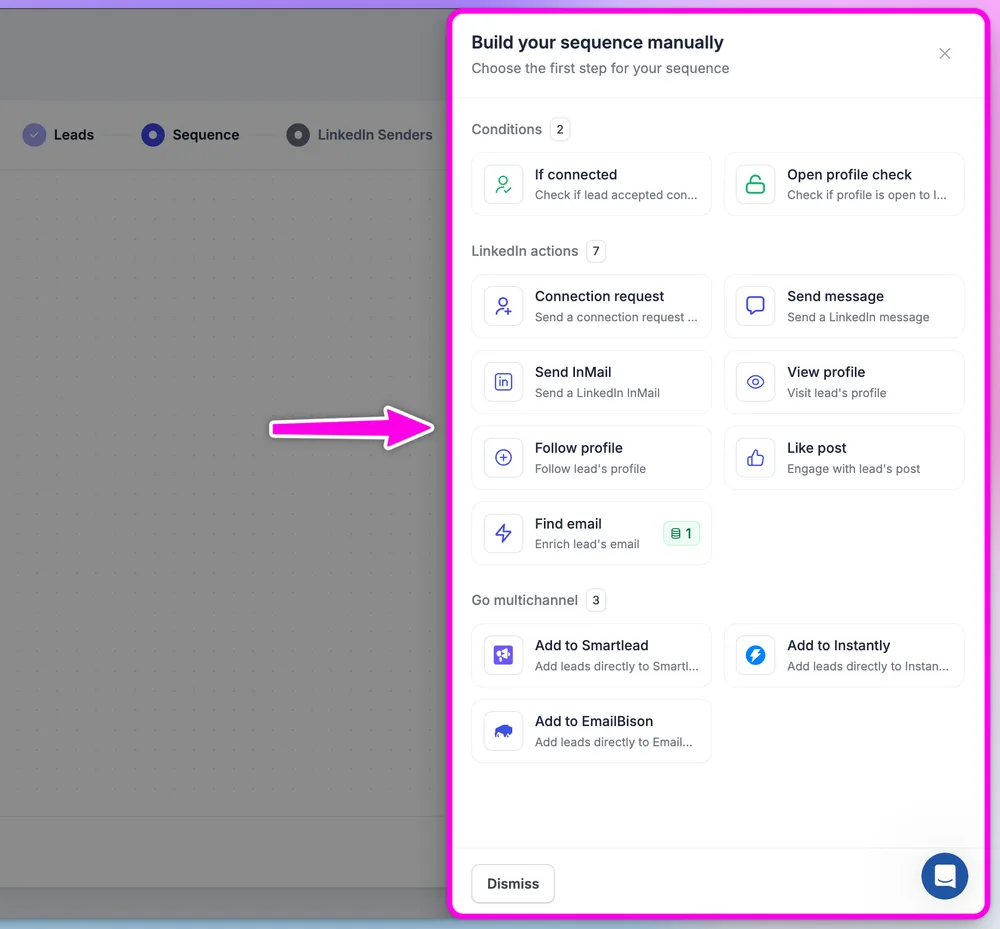
My first sequence was the classic one: a profile view, a connection request, then two follow-up messages. You'll see the steps top to bottom with a delay between each, and the step palette opens beside them. Templates and the canvas, rebuilt in June 2026, make a first sequence quick to assemble.
The palette holds the LinkedIn actions: view a profile, follow, like a post, and send a connection request, a message or an InMail. A voice note step joined them in September, still in beta. Find Email looks up a lead's address and spends an email credit, and each Growth sender comes with 100 to start.
Two conditions check whether a lead is connected to you and whether their profile is open. Email goes out through a hand-off, not from HeyReach: a step passes your leads to Instantly, Smartlead or EmailBison. When a lead replies, HeyReach pauses them in those tools too.
HeyReach keeps at least three hours between two actions, so you'll plan a four-step sequence over days, not hours. Sequences save as you build. Once a campaign is live, though, you can't add or remove steps, and the fix is to duplicate it.
A sender's daily limits belong to the sender, not the campaign, so two campaigns on one sender share one pool. The first one launched gets priority, and HeyReach's help center recommends at most two active campaigns per sender. Set those daily numbers under LinkedIn's connection limits.
2. Message variations and personalization
Message variations are HeyReach's A/B test. You add a second version of a connection note, a message or an InMail in a few clicks, and HeyReach splits your leads between them.
Variables fill each message with the lead's details. You'll see every message as the prospect will before it goes out, connection note included, which catches a broken variable before a lead does.
What I'm missing is spintax. Variations swap whole messages, but nothing varies the words inside one, and spintax sits on HeyReach's public roadmap as a wish-list request.
InMail steps sit in the same builder. They need Sales Navigator on the sending account and spend its InMail credits, and the Open profile check helps you save those credits.
My advice: test one change per variation, and let each one run a full week before you pick a winner.
3. The unibox
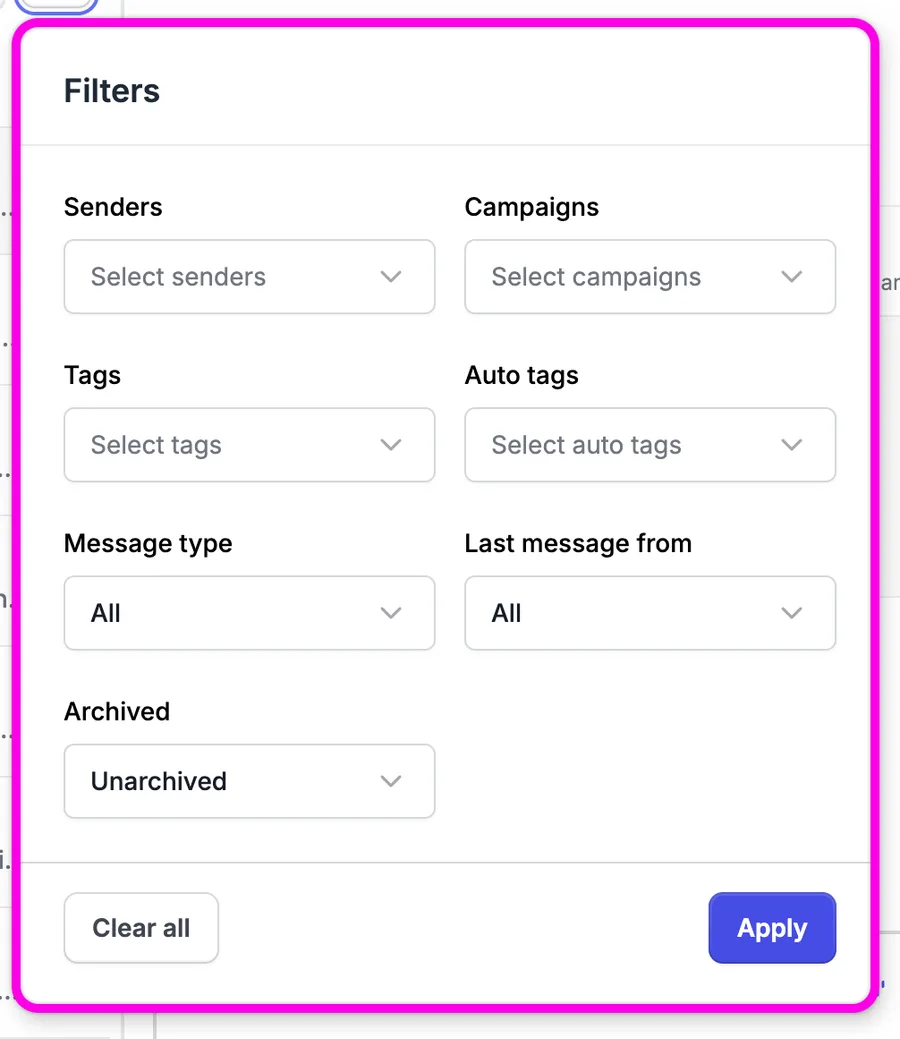
Every sender's replies land in one inbox, which HeyReach calls the unibox. You'll see replies from all your senders in one list, each labeled by sender, with the open conversation beside it. You reply without opening LinkedIn, and without logging in and out of accounts.
Filters sort by sender, campaign, tags, message type and who sent the last message, and archived chats drop out of view. Filtering by who sent the last message shows which chats still wait on your reply.
You can answer as any of your senders. HeyReach's help center says the unibox "allows one person to manage multiple inboxes at once", and its agency page promises that a client's private messages stay private.
Honestly, it's the best-designed screen in the product, and the one you'd live in. For an agency answering replies across many accounts, it saves real time every day.
4. Teams, clients and integrations
Agencies get workspaces, and they're well done. Each one keeps a client's senders, leads and campaigns apart, and you switch between clients under one login. I gave each of my two clients a space of its own.
You choose which workspaces each teammate sees, with view or manage rights per screen. Clients can get a view-only login to their own dashboard, which HeyReach pitches as a client portal.
To keep two campaigns off one prospect, HeyReach offers exclusion filters at launch and a workspace Blacklist of people and companies. Both of the Blacklist's exclude options come ticked by default.
White-label comes with Agency, with one brand included, and HeyReach's team sets it up on request. Their help center says "HeyReach-branded features are not available for white-label users", and the Instantly and Smartlead hand-offs switch off.
API access, webhooks and an MCP server come with every plan. Native integrations cover HubSpot, Attio and Breakcold, with Clay, Slack, Zapier, Make and n8n alongside.
Is HeyReach safe?
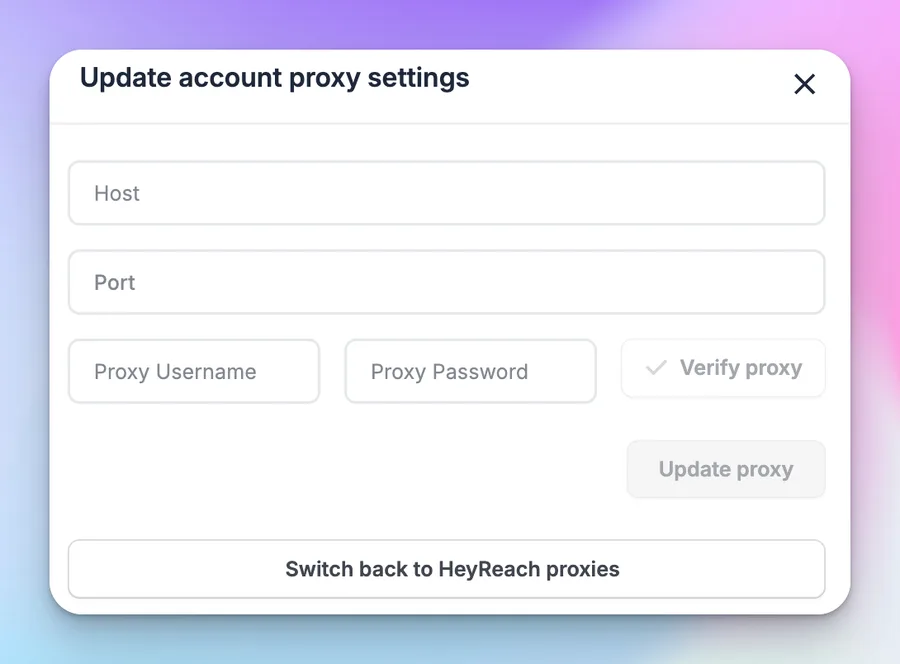
HeyReach says every Growth sender gets a dedicated residential proxy. On Agency and Unlimited, its pricing FAQ says the plans "require you to bring your own proxies".
So I set up the bring-your-own route with BrightData in August 2026. That meant a separate account and a dedicated proxy at $3–4 a month for every sender, each one entered in a form like this by hand.
HeyReach builds in its own brakes. Cooldown Mode stops connection requests when LinkedIn refuses more, until the next week starts. Locks hold connection requests back for a couple of hours when HeyReach detects pushback.
You can't lift either one by hand, and a Lock doesn't show in the app, so only support can confirm one. HeyReach also caps each sender's connection requests per week, and its help center recommends a slower daily pace once an account is warmed up.
Warm-up is on you. HeyReach has no warm-up feature, and its help center asks you to build each new account up by hand before you connect it. I took a fresh account to 100 connections through LinkedIn's suggestions first.
No automation tool takes account risk to zero. Should LinkedIn restrict an account anyway, our guide to a restricted LinkedIn account walks you through the first hour.
HeyReach pricing
HeyReach bills per sender, and each sender is one LinkedIn account:
| Plan | Price | Included |
|---|---|---|
| Growth | $79 per sender a month ($59 from ten senders) | A proxy per sender, unibox, API, webhooks |
| Agency | $999 a month for 25 senders | Own proxies, one white-label brand |
| Unlimited | $2,999 a month | Up to 300 senders, own proxies |
The 14-day free trial covers up to three senders and asks for no card. Sign-up was quick, and the trial doesn't roll into a paid plan on its own.
The catch: Agency and Unlimited leave out the proxies. Move to a bundle for its sender count, and you buy and connect a proxy for every sender yourself. At 25 senders, that's another $75–100 a month in proxies, plus the setup. Fifty senders cost $1,399 a month on the same terms.
For yearly rates, refunds and the bill at every sender count, see our HeyReach pricing breakdown.
Is HeyReach right for you?
HeyReach suits an agency running 25 or more accounts that already buys proxies and warms accounts up itself. Look elsewhere if you want:
- A proxy included on every account, at any size
- New accounts warmed up for you
- Spintax inside your messages
- The same plan at 3 accounts or 300
Replygrow: a simpler HeyReach alternative with the proxy included
If you want every feature on one plan, safer accounts and no proxy to manage, Replygrow is the tool we built for that.
- Less at five accounts: five accounts cost $375 a month, against $395 on HeyReach Growth.
- No proxy to buy or connect: a dedicated residential proxy comes with every account, at any size. HeyReach's agency plans leave it to you, at $3–4 a proxy a month.
- Every feature, one plan: five lead sources, one inbox for all accounts, a company per client, spintax and A/B tests.
- Safer accounts: a 14-day warm-up from 5 to 30 invitations a day ramps every new account for you. No tool can rule out a restriction, but they're rare.
- More replies: Replygrow teams see a 15–35% higher response rate and 3x more meetings booked weekly.
- Easy to start: a 7-day free trial with no card, and a first campaign live the same day.
With Replygrow, the account you add arrives ready to send. Every rate and discount is listed on our pricing page.
Other HeyReach competitors
Beyond Replygrow, three more tools deserve a look:
Our LinkedIn automation comparisons put all of them side by side.
HeyReach review verdict: is it worth it in 2026?
Our score
3.5/5
HeyReach leaves the proxies on its agency plans and every warm-up to you, has no spintax, and draws support complaints.
HeyReach is built for big numbers, 25 accounts and up, but the plans made for that size leave the proxies to you.
The short version of this HeyReach review: rotation and the unibox are excellent, but you buy and connect a proxy per sender on the agency plans, warm every account by hand and write without spintax.
Replygrow takes the lead with a dedicated residential proxy on every account at any size, a 14-day warm-up that ramps each new account for you, and spintax in every message.
Frequently Asked Questions
1) What is HeyReach used for?
HeyReach is used for LinkedIn outreach across many accounts: one campaign sends from several accounts, and every reply lands in one inbox. Agencies and sales teams use it to add volume.
2) Is HeyReach legit?
Yes. HeyReach is an established, paid LinkedIn outreach tool, rated 4.6 from 71 reviews on G2 and 4.1 from 52 on Trustpilot. The complaints that repeat are slow support and a strict refund policy.
3) How much does HeyReach cost?
HeyReach costs $79 per sender a month on Growth, and Agency is $999 a month for 25 senders. The catch: Agency and Unlimited need your own proxies.
4) Is HeyReach free?
No. HeyReach has no free plan, but its 14-day trial covers up to three senders with no credit card, and it doesn't turn into a paid plan on its own.
5) Is HeyReach safe?
Like any LinkedIn automation tool, HeyReach puts your account at some risk. Cooldown Mode and Locks slow an account when LinkedIn pushes back, but warm-up is by hand, and the agency plans need your own proxies.
6) What are the best HeyReach alternatives?
Start with Replygrow, the tool we built: a dedicated residential proxy and warm-up on every account at any size, and spintax in every message. Also compare Dripify, Expandi and Waalaxy.
7) HeyReach vs Replygrow: what's the difference?
HeyReach includes proxies only on Growth and leaves warm-up to you. Replygrow puts a dedicated residential proxy and warm-up in every account at any size, and adds spintax in every message.
Get 3x more replieson LinkedIn
Set up in minutes. 7-day free trial, no credit card.
Try Replygrow free