
Linked Helper Review 2026: Features, Pros & Cons, Verdict

Does a desktop LinkedIn tool still make sense? This Linked Helper review covers what it does and what it takes to run.
I ran Linked Helper for 14 days on a Mac in August 2026, with one campaign from start to finish. Then I compared notes with users on G2, Capterra and Trustpilot.
It's for solo sellers, recruiters and growth hackers weighing Linked Helper 2, often searched as LinkedIn Helper or LinkedHelper, against other LinkedIn automation tools.
Linked Helper at a glance
Linked Helper is desktop LinkedIn automation software for Windows, Mac and Linux. It clicks through LinkedIn in its own browser window, visiting profiles and sending invitations and messages for you.
It runs on your own computer or on a VPS you rent, so a campaign sends only while that machine is on. It's aimed at recruiters, growth hackers and solo sellers, and one license runs one LinkedIn account.
My first impression: it does more than any tool I've used, and it looks and feels like it. The screens are dense and dated, and you'll spend a while finding your way around.
| Verdict | Linked Helper |
|---|---|
| Price | $45/license/month on Pro |
| Best for | One operator, always-on computer |
| Integrations | HubSpot, Salesforce, Pipedrive, Zoho |
Linked Helper pros and cons
| Pros | Cons |
|---|---|
| The widest action set: endorse, like, follow, event and group invites | Runs only while your computer is on |
| Message templates with variables, spintax and IF/ELSE | Complex, with a dated interface |
| Works with Sales Navigator and full Recruiter | Standard is capped, so full outreach needs Pro |
| A built-in CRM with tags | Heavy on your machine |
| A 14-day trial with full Pro and no card | Proxies are yours to buy, one per account |
Linked Helper feature overview
The rest of this Linked Helper review goes step by step through the app: a campaign and its leads first, then messages, the LinkedIn actions and the inbox.
1. LinkedIn outreach campaigns and lead sources
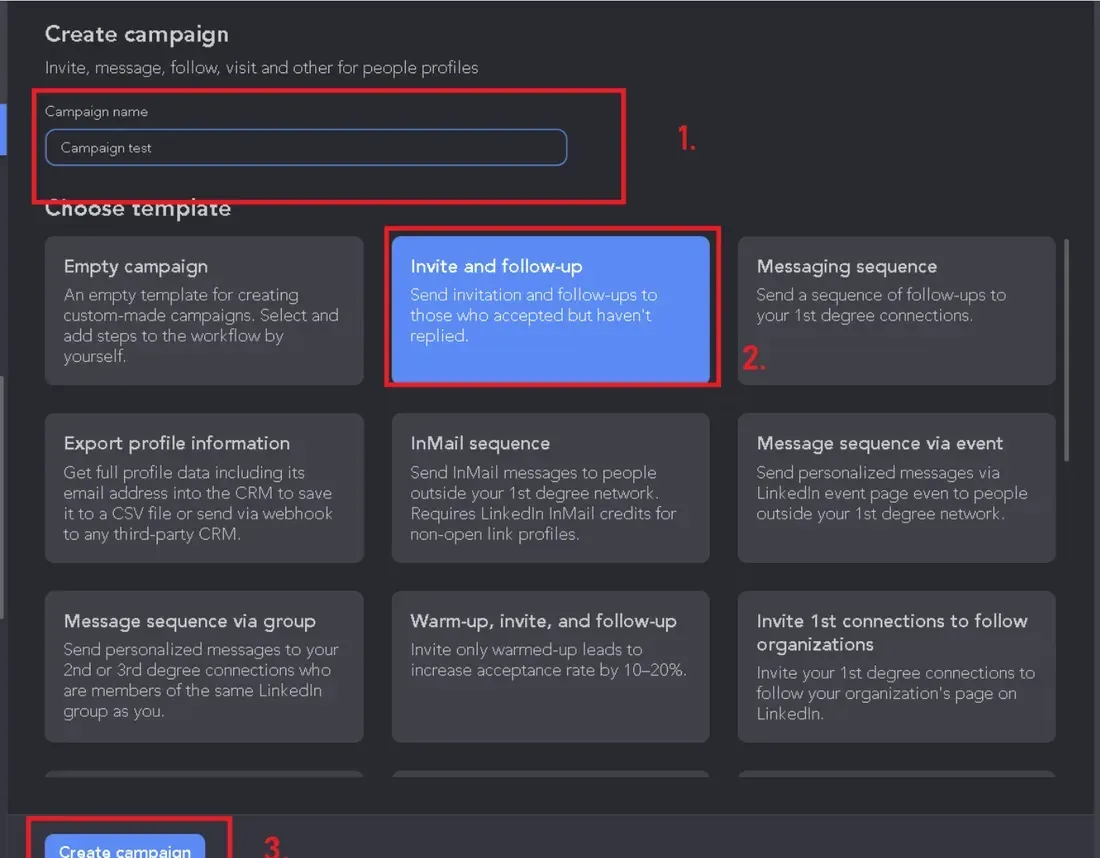
Linked Helper is an app you install, not a website. I put it on my Mac and signed in to LinkedIn inside it. From there it clicks through LinkedIn the way a person would, in a browser window of its own.
A campaign starts in a wizard. The templates cover invite and follow-up, messaging sequences, InMail sequences and profile exports, or you start from an empty campaign.
You click Create Campaign, pick one, and edit the text with variables like the first name. A Smile Picker drops in emoji if you want them.
Then you choose where the leads come from. For my first campaign, I skipped the welcome message and picked LinkedIn website, then Search page. You open a LinkedIn search, click the billiard-balls icon in the sidebar and choose From current page, and the blue Start campaign button does the rest.
Before the first send, set three things: your daily limits, your working hours and the window for withdrawing stale invitations, which Linked Helper sets at 30 days. Stale invites drag down your acceptance rate. Keep the daily numbers well under LinkedIn's connection limits, too.
Lead sources
Linked Helper gathers leads from more places than most tools, and Auto-Collect can re-run a saved search on a schedule. You can pull leads from:
- LinkedIn, Sales Navigator and Recruiter search pages, or a CSV file
- Your connections, group members, event attendees and school alumni
- Company employee lists, and the people who liked or commented on a post
- Profile viewers, pending invitations, Sales Navigator lead lists and Recruiter projects
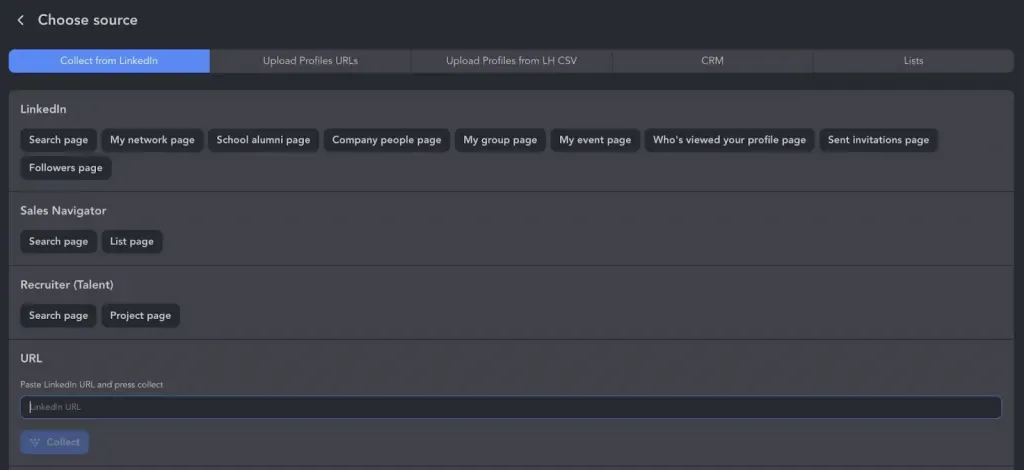
I pasted a LinkedIn search page into a new campaign and watched it collect profiles. That worked on the first try, though segmenting a big list afterward is slow.
Recruiter Lite and full Recruiter both work, with Recruiter projects as a source. A campaign can also switch where it processes profiles: regular LinkedIn, Sales Navigator or Recruiter.
A Sales Navigator search needs a Sales Navigator seat, and a Recruiter project needs a Recruiter seat. So check what your LinkedIn plan covers before you build a list.
Then I closed the lid for a meeting. When I opened the Mac again, the campaign sat paused where I'd left it.
The app does the clicking, so it has to be running, awake and online. On a Local license, your data lives on your computer too. As one Capterra reviewer put it in April 2023, "To run automations your computer must be running."
The app also worked my Mac hard. Linked Helper says each account running at once needs 2 GB of free RAM and half a processor core, and the operating system takes another 0.5 GB. One G2 reviewer writes, "The software is really heavy and sometimes it makes my computer stop and crash."
Linked Helper's own FAQ says it doesn't run while your computer is off, on either storage version. Its answer for round-the-clock sending is a VPS, which is one more machine for you to rent and look after.
2. Message templates and conditions
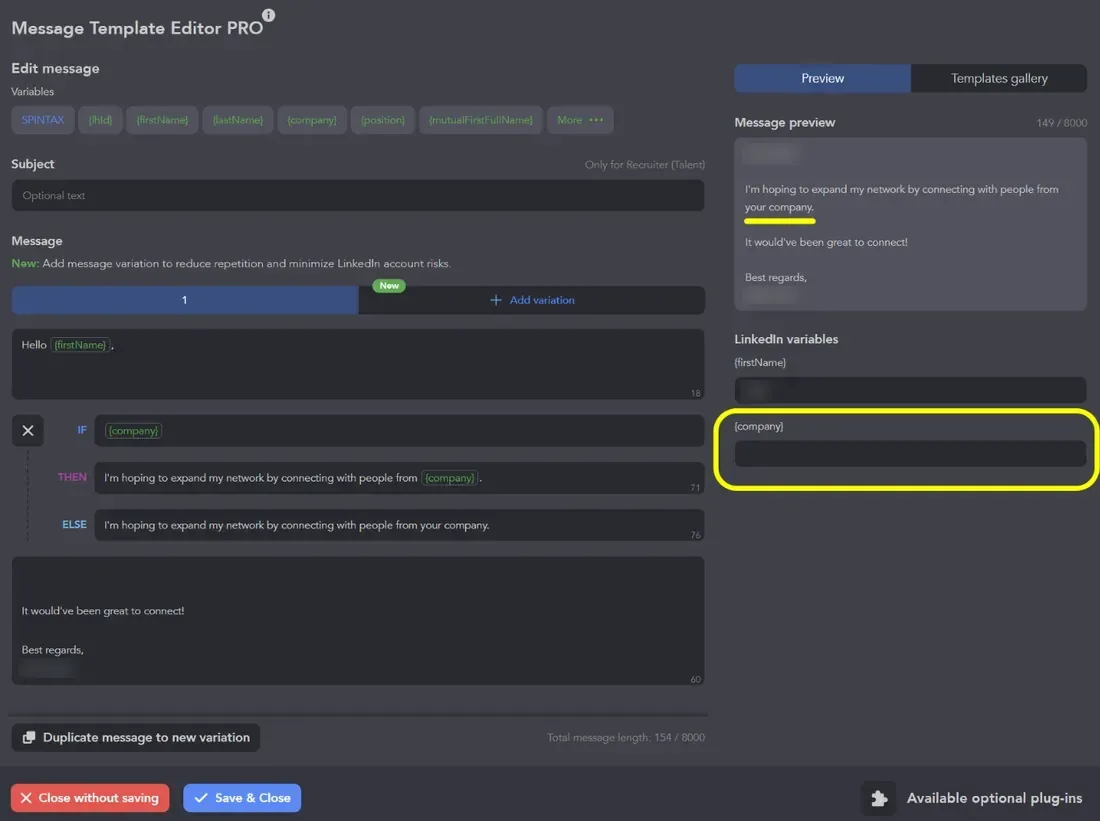
Getting my first campaign right took real work. Every setting lives on a different panel, and finding the ones that matter takes a while. One Capterra reviewer wrote in June 2026, "There is a small learning curve at the beginning, especially when setting up campaigns."
Templates take variables like the first name and company, and spintax rotates your wording so messages don't repeat. You can also write two versions of a message, and Linked Helper sends them in equal proportions.
Conditions use IF-THEN-ELSE clauses, and you can nest them. Keep in mind that they branch the words of a message, not the path of a campaign. A clause can swap a sentence when a variable is empty, like a profile with no company.
It's a real message engine, but every clause is written by hand. My advice: start with one clause on a field you trust, and preview a few leads before you launch.
3. Engagement actions and Standard vs Pro
This is where Linked Helper pulled ahead for me. Beyond visits, invitations and messages, it can endorse skills, like and comment on posts, and follow people. It can also invite them to events, groups and your company page, and send InMail, which spends your LinkedIn InMail credits.
It finds email addresses and enriches profiles too, though the email finder spends a credit for every email it finds. One Trustpilot reviewer wrote in March 2026 that "a lot of functionality is very well thought out."
Here's the catch: Standard caps eleven of those actions at 20 a day. Linked Helper's pricing page lists group and event messages, likes and comments, invitations to events, groups and company pages, and CRM and webhook sends among them.
A G2 reviewer likes the follows, likes and endorsements, but lists this downside: "limit of liking 20 post a day." Standard also leaves out messaging-history export, and it gets 620 data credits a month against Pro's 3,100.
Pro lifts each cap, and a Standard license can't be upgraded until it expires. So I'd say you really need Pro to run full outreach.
4. Inbox, workspaces and integrations
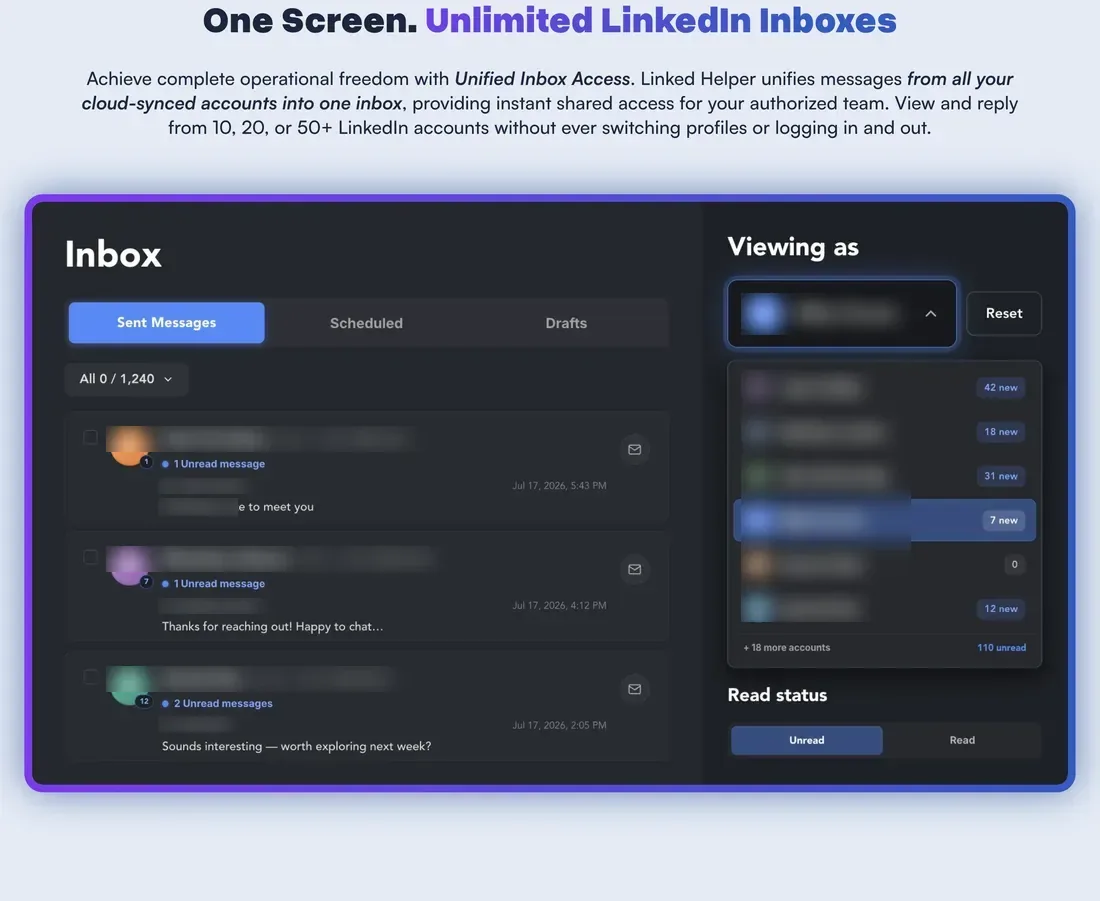
Linked Helper has a built-in CRM where you tag the people a campaign finds, and reviewers like it. On a Local license, the Inbox covers one account's conversations. Reply detection reads your last 200 chats on its first run, then checks every three hours by default.
Workspaces work on any license, so each client can get a space of its own, with white-label and view-only Guest access. Sharing data across accounts needs a Cloud license, and that's where the Unified Inbox pools 20 or more accounts in one view.
Cloud changes where your data lives, not where the automation runs. Every account still runs on a computer that stays awake: a VPS you rent, or a client's own machine reached by remote control.
One license runs one account at a time, and Linked Helper's hardware guide recommends a dedicated server past ten accounts.
One Trustpilot reviewer bought 25 licenses for three months and found the app "too bulky for usage across accounts" within 15 days. In practice, I found it a single-user tool, and I wouldn't run clients' accounts on it.
Linked Helper connects natively to eleven CRMs, including HubSpot, Salesforce and Pipedrive, plus Google Sheets. Outgoing webhooks work on every license, and incoming ones need Cloud.
Every AI feature runs on both plans on credits, from AI Messages to a Reply Assistant that suggests your next answer in the Inbox.
Is Linked Helper safe?
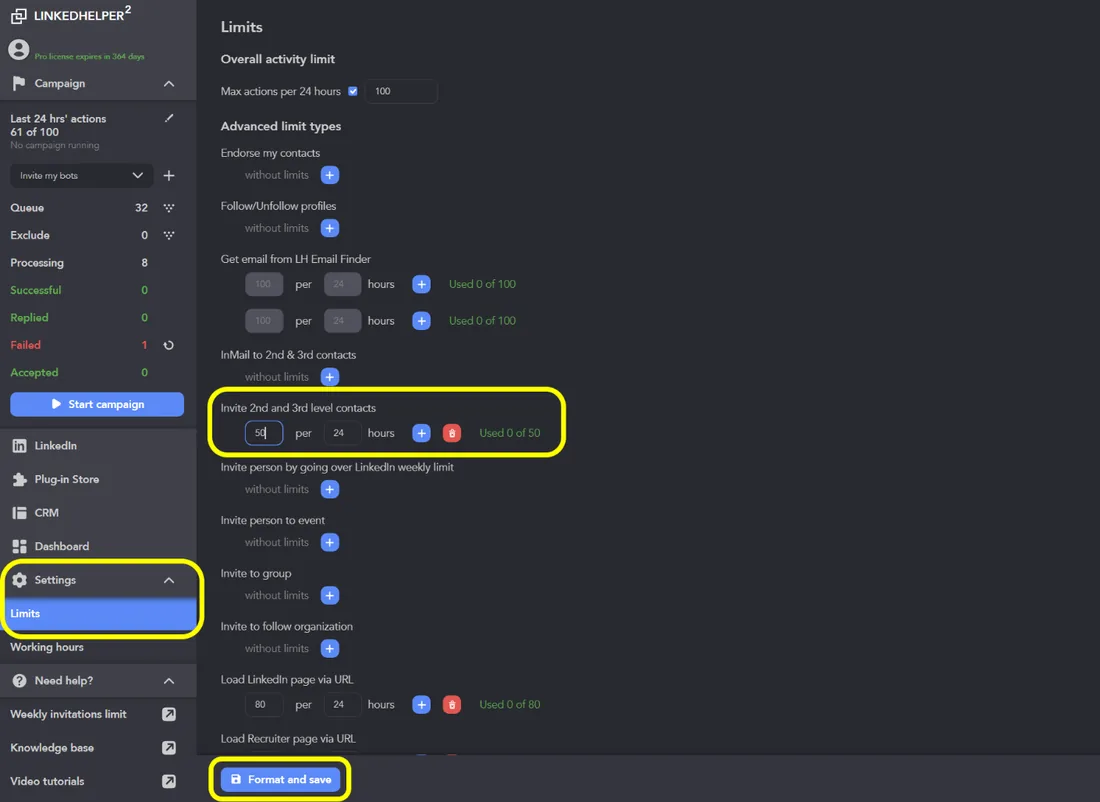
Linked Helper says it was built for safety. It injects no code into LinkedIn's page and doesn't use the LinkedIn API. Each account gets its own sandbox and browser fingerprint, and the app checks a proxy's risk score before a campaign starts.
I credit that design. The default limit is 150 profiles per 24 hours, and Linked Helper suggests 50 invitations a day for accounts older than a year. You set every number yourself on the Limits screen.
The proxy is yours to buy, one per account. And some users still report trouble, like one Trustpilot reviewer in March 2026: "The tool used up all my InMail credits, despite the filters I had set up." They report a restriction too.
The plainer risk is uptime: a sleep or a crash stops a campaign mid-run.
Every LinkedIn automation tool carries some account risk, because LinkedIn doesn't publish its thresholds. Should an account get restricted, our guide to a restricted LinkedIn account covers the first hour.
Linked Helper pricing
Linked Helper sells one license per LinkedIn account, on two plans and two storage versions:
| Plan | Price | Included |
|---|---|---|
| Standard | $15 per license a month | Eleven actions capped at 20 a day |
| Pro | $45 per license a month | No daily caps, full outreach |
| Pro on Cloud storage | $59.90 per license a month | Pro plus shared data, pooled inbox |
The 14-day free trial gives you full Pro with no card, and nothing renews when it ends. Your campaigns simply pause. My advice: close the lid mid-campaign during the trial, and see what stops.
The license is only part of the bill. It leaves out a proxy for each account and a computer or VPS that stays on. Leads from Sales Navigator add its cost on top, per account.
Is Linked Helper right for you?
Linked Helper suits one operator running one LinkedIn account, who wants every LinkedIn action and doesn't mind configuring it. It's hard to run several accounts for a team or agency, because each one runs only while the app is open on a computer that's on. Look elsewhere if you want:
- Campaigns that keep running with your laptop closed
- A simpler setup with nothing to install
- A proxy included with every account
- Many accounts at once, with no hardware to scale
Replygrow: a simpler, cloud-based Linked Helper alternative
If you want campaigns that run with your laptop closed, a simpler setup and a proxy and warm-up on every account, Replygrow is the tool we built for that.
- Runs in the cloud: campaigns send on their active hours with your laptop closed, for every account and client, with no app to install or machines to keep on.
- Every feature, one plan: five lead sources, one inbox for all your accounts and A/B tests, with no capped tier or Cloud license to add.
- Account safety built in: a dedicated residential proxy in the country you choose and a 14-day warm-up from 5 to 30 invitations a day on every account. Restrictions are uncommon, and no tool can rule them out.
- More replies: Replygrow users see a 15–35% higher response rate and 3x more meetings booked weekly.
- Easy to start: 7 days free, no card. Paste a LinkedIn search URL, preview every message and launch today.
With Replygrow, nothing runs on your computer, and one plan holds every feature. The rates for every team size are on our pricing page.
Other Linked Helper competitors
Beyond Replygrow, compare these three:
For a side-by-side view of all of them, see our LinkedIn automation comparisons.
Linked Helper review verdict: is it worth it in 2026?
Our score
3/5
Linked Helper has the widest action set, but it's complex and runs only while your computer is on, which makes it a single-user tool.
Linked Helper does more than other tools, and its safety design is careful, but it's complex and runs only while your computer is on.
The bottom line of this Linked Helper review: you really need Pro for full outreach, and in practice it's a single-user tool, not one for clients' accounts.
Replygrow takes the lead with campaigns that run in the cloud, a simpler setup, and a dedicated residential proxy and warm-up on every account.
Frequently Asked Questions
1) What is LinkedIn Helper?
LinkedIn Helper, properly Linked Helper, is desktop LinkedIn automation software for Windows, Mac and Linux. It visits profiles, sends invitations and messages, and likes, endorses and follows for you, but only while your computer or a VPS is on.
2) Is Linked Helper legit?
Yes. It's a real, established product, scoring 4.9 from 278 reviews on Capterra and 4.8 from 468 on Trustpilot. Refunds and the learning curve are the usual complaints.
3) How much does LinkedIn Helper cost per month?
Linked Helper Pro costs $45 per license a month, and one license runs one LinkedIn account. Standard is $15, but it caps eleven actions at 20 a day. Add a proxy per account and a computer that stays on.
4) Is there a Linked Helper free trial?
Yes. The 14-day trial gives you full Pro with no credit card, and nothing renews when it ends. Your campaigns simply pause until you buy a license.
5) Can Linked Helper get you banned?
Any LinkedIn automation tool can. Linked Helper injects no code and gives each account its own sandbox, but some users report restrictions anyway. Keep volumes low and use a separate proxy per account.
6) What are the best Linked Helper alternatives?
Replygrow, the tool we built, is where we'd start: it runs in the cloud, it's simpler to set up, and every account gets a dedicated residential proxy and warm-up. HeyReach, Dripify and Waalaxy round out the shortlist.
7) Linked Helper vs Replygrow: what's the difference?
Where they run. Linked Helper is desktop software, so campaigns need a computer or VPS that stays on, and full outreach needs Pro. Replygrow runs in the cloud, with every feature on one plan, one inbox for every account, and a dedicated residential proxy and warm-up on each.
Get 3x more replieson LinkedIn
Set up in minutes. 7-day free trial, no credit card.
Try Replygrow free