
Waalaxy Review 2026: Features, Pros & Cons, Verdict

Is Waalaxy as easy as it looks? This Waalaxy review covers its ready-made sequences, its paid inbox and where it falls short.
I tried it myself on its 14-day trial, with one campaign built from a LinkedIn search URL. After that, I read through user reviews on G2, Capterra and Trustpilot.
It's for solo sellers, founders and small teams weighing Waalaxy against other LinkedIn automation tools.
Waalaxy at a glance
Waalaxy is a cloud LinkedIn prospecting tool from France. You pick a ready-made sequence, such as a profile visit, an invitation and two follow-up messages, point it at a list, and it sends them for you.
It runs in the cloud, so campaigns keep going with your laptop closed. It's aimed at solo sellers and small teams, and you need one license for each LinkedIn account.
My first impression was a crowded screen. The app works, but it's unpolished and less user-friendly than other tools I've used.
| Verdict | Waalaxy |
|---|---|
| Price | $99/user/month on Advanced |
| Best for | One person, one LinkedIn account |
| Integrations | HubSpot, Pipedrive, Zapier, Make |
Waalaxy pros and cons
| Pros | Cons |
|---|---|
| Ready-made sequences that get a first campaign out fast | The interface is cluttered and unpolished |
| Leads from the people who react to posts, join groups or attend events | The inbox is a paid add-on after 500 free conversations |
| Runs in the cloud with nothing to install | You warm up by hand, and up to five users share one IP |
| Daily counts that vary between 80% and 100% of the cap | Teammates can't see each other's inbox |
| Acceptance and reply rates for every campaign | You need a card for the trial, and billing complaints repeat |
Waalaxy feature overview
The rest of this Waalaxy review moves through the app as a new user would: leads and a sequence first, then messages, the inbox and the features for teams.
1. LinkedIn campaigns and lead imports
Waalaxy runs in the cloud, so a launched campaign keeps sending after you close your laptop. It went fully cloud on July 1, 2026. Its help center says the Chrome extension was removed from the Chrome Web Store.
You don't need to install anything, though an optional import extension, Alien Copilot, still exists. You log in with LinkedIn and land on your campaigns and prospect lists.
The screen is cluttered, with menus, lists and counters competing for attention, so finding a setting took me longer than it should. You'll find a help center article for nearly every step, which helps.
Like most tools here, Waalaxy bills per LinkedIn account. Its blog puts it plainly: "one Waalaxy license = one LinkedIn account."
Waalaxy is France-first. It began in Montpellier in 2019 as ProspectIn, France is still its biggest audience, and Waalaxy says the app comes in 10 languages.
Support works 9am to 6pm France time, Monday to Friday. One US reviewer on Trustpilot wrote in November 2025 that "the only time they are online is in the middle of the night."
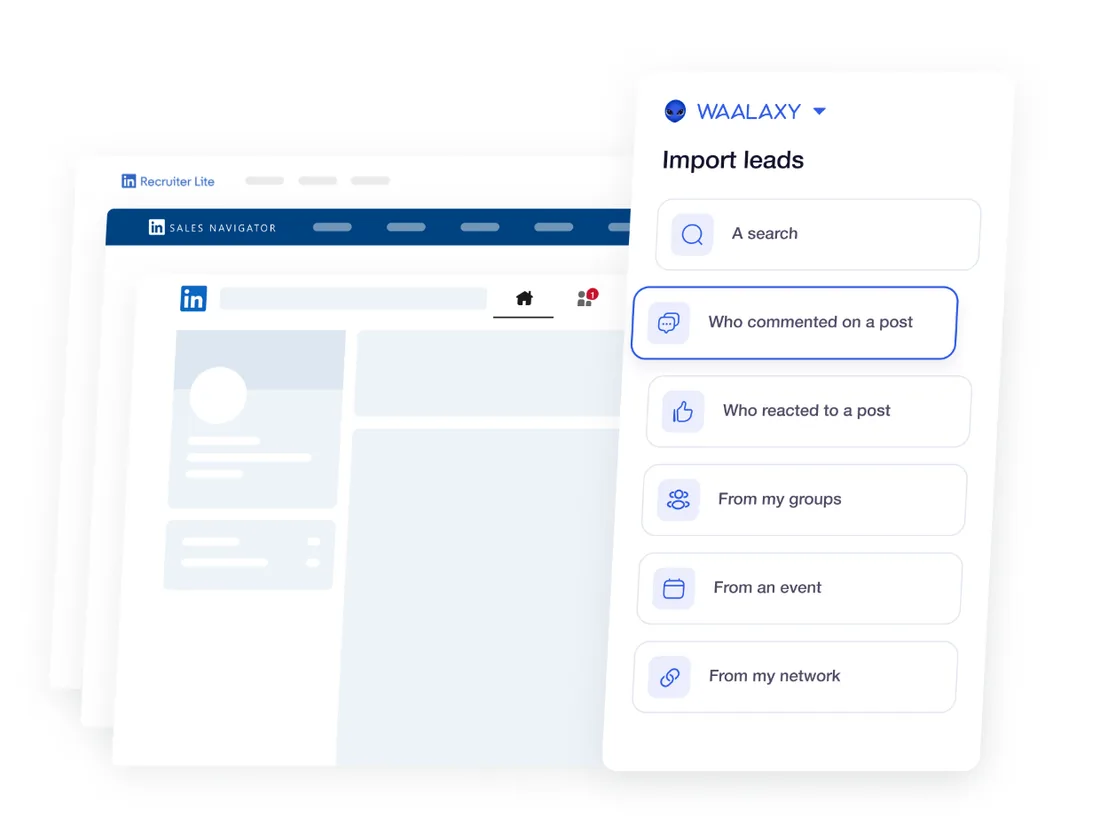
To add leads, you click Import prospects under Prospects and pick a source. I pasted a LinkedIn search URL, and the list filled itself. The post and group imports help you find warm leads, since Waalaxy pitches them as buying-intent signals.
A Sales Navigator import needs your own license, so put what Sales Navigator costs in the budget. Only the first 2,500 results of a Sales Navigator search import, and anti-duplicate import keeps two teammates off the same prospect. You can pull leads from:
- A LinkedIn search URL, or one from Sales Navigator or Recruiter Lite
- Your own network, a group or an event
- People who reacted to or commented on a post
- A CSV file of LinkedIn profile URLs
Ready-made sequences and conditions
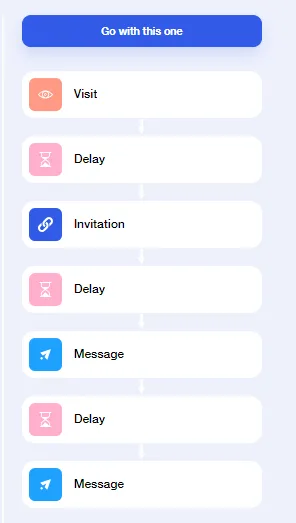
You click Start a campaign and browse the templates, with filters for your target, the channel and the number of messages. The templates are a real time-saver, and you can launch a first campaign without designing anything.
I picked Invitation + 2 Messages: a profile visit, an invitation, then two messages with a delay between each. Here's the catch: I couldn't build my own sequence.
Waalaxy's help center says you can't add or remove an action in a template, and one Trustpilot reviewer wrote that it's "not possible to create your own sequence, nor request one." Once a campaign runs, you can still edit the message text and the delays.
Conditions are built into each template, so you never wire a branch by hand. A message goes out only once the invitation is accepted, and anyone who doesn't accept in time leaves the campaign. You'll see each person's status in the Prospects tab, such as waiting for condition.
When someone replies, Waalaxy says they leave the campaign automatically. Some reviewers say otherwise, describing replies that didn't stop a sequence and messages that arrived mid-conversation. So test it in the trial: reply to your own campaign and watch what happens next.
Invitations draw on a monthly quota that depends on your plan, and LinkedIn's connection limits set the ceiling for any tool.
Several campaigns share one queue, and the oldest goes first. You'll see each campaign's acceptance and reply rates in its Analytics tab, in a clean, readable view.
2. Messages, personalization and AI
You can add variables from each prospect's profile, and a preview shows you the message the way it will read. Waalaxy also cleans name variables for you: it drops emojis and titles, and fixes the capitals.
You can record a voice note to send inside a LinkedIn message, though not in an invitation note or an email. Positive replies are flagged automatically on every plan, so the warm ones are easy to spot.
Waami, the built-in AI writer, asks for a target, a value proposition and a call to action, then writes the message. It drafted a usable first message for me.
Waalaxy also sells Waalaxy AI, a separate product where an AI agent finds prospects and writes the messages for you. This review covers the original app, now called Waalaxy Classic.
My advice: keep variables to the opening line, and read the preview of every message before a campaign launches.
3. The inbox
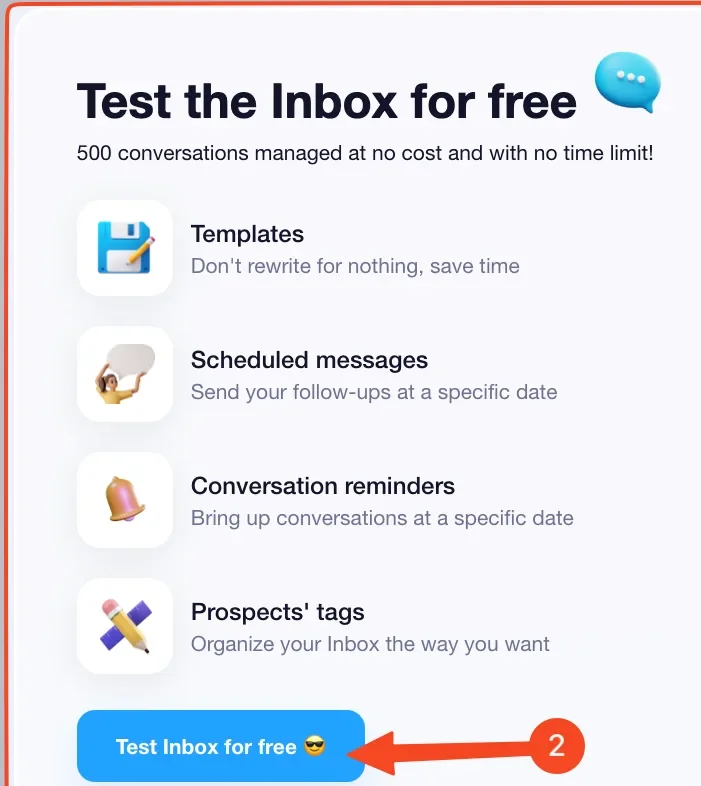
You open Inbox in the left menu and click Test Inbox for free. It's Waalaxy's own view of your LinkedIn conversations, and you can reply from it. Keep in mind that you have to leave a LinkedIn tab open for the Inbox to sync.
The Inbox isn't part of any plan. Waalaxy gives you "500 free conversations, no time limit." After that, you pay $20 a month per seat for the add-on, billed on the same cycle as your plan.
Watch the trial edge. One Trustpilot reviewer wrote in July 2025: "I lost access, with all the reminders who to reply to."
In a team, every seat keeps its own inbox. Waalaxy's team FAQ says it's not possible to view the inbox of other team members, which is worth knowing before you buy for several reps.
4. Teams, agencies and integrations
In Team, you open each member's app in one click, and you can add or remove seats at any time. Seats aren't tied to a person, so a new hire takes a leaver's seat at no extra cost.
For agencies, Waalaxy gives each client a seat inside your team, so client data stays separate and you switch between accounts from one place. Its agencies page says plainly: "No, we don't offer white-label." And you can't share campaigns between team members.
Native integrations cover HubSpot and Pipedrive. Salesforce, Zoho, Sellsy, Airtable and the rest connect through Zapier, Make or n8n.
Keep the plan gates in mind. Pro exports prospects to your CRM, natively or through Zapier, Make, n8n or a webhook. Importing prospects through those tools, the public API and the MCP server start on Advanced, and cold email sending is on Business.
A small in-house team gets what it needs here. An agency will miss white-label first.
Is Waalaxy safe?
Waalaxy's cloud guide says the cloud adds no extra risk of detection. You get a fixed VPN IP close to your location, and up to five users share one IP.
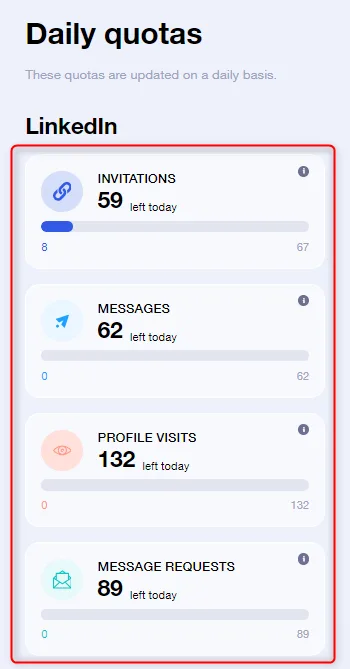
Advanced and Business allow up to 100 invitations a day, within 800 a month, and Pro 300 a month. Waalaxy varies each day's count a little under the cap, and it documents every quota in plain numbers.
Warm-up is on you. Waalaxy's help center says an account needs at least 200 to 300 connections before any automation, or you risk "a quick ban." On a quiet account, it suggests you keep to about 30 actions a day per type.
Some users report trouble. One Trustpilot reviewer wrote in April 2026 that invitations showed as sponsored and "my response rate declined to 9.1%," and Waalaxy replied that low response usually traces to the profile or the message. Another says their account was restricted days after buying.
Some risk comes with every LinkedIn automation tool. If your account does get restricted, our guide to a restricted LinkedIn account covers what to do in the first hour.
Waalaxy pricing
Waalaxy bills in euros, shown here in dollars with the same figures. It sells three plans, and you need a license for each LinkedIn account:
| Plan | Price | Included |
|---|---|---|
| Pro | $39 per LinkedIn account a month | 300 invitations a month, CRM export |
| Advanced | $99 per LinkedIn account a month | 800 invitations, API, MCP, Zapier imports |
| Business | $139 per LinkedIn account a month | Advanced plus cold email sequences |
The Inbox sits outside all three. After the 500 free conversations, you pay $20 a month for each seat.
The 14-day free trial needs a credit card. I picked a plan and a billing period first, and that choice is charged when the trial ends. Waalaxy's help center says "No reminder is sent before your first charge," so set your own for day 13.
The pricing page opens on yearly billing. Yearly rates, refunds and the cost as you add accounts are in our Waalaxy pricing breakdown.
Is Waalaxy right for you?
Waalaxy suits a solo seller in Europe with one LinkedIn account who wants ready-made sequences, or LinkedIn and email on one plan. Look elsewhere if you want:
- A cleaner app that's quicker to learn
- One inbox for all your accounts, in the price
- A proxy and warm-up on every account
- A free trial with no card
Replygrow: a more cost-effective Waalaxy alternative
If you want a cleaner app, more features, safer accounts and a lower bill than Waalaxy, Replygrow is the tool we built for that.
- A lower price: $79 per account a month, against $99 on Waalaxy Advanced, with the inbox already included.
- Discounts as you grow: five accounts cost $375 a month, and the rate keeps falling, up to 50% off at 50.
- Every feature, one plan: five lead sources, one inbox for all accounts, a dashboard login per client and A/B tests.
- Safer accounts: every account gets a dedicated residential proxy and a 14-day warm-up from 5 to 30 invitations a day. Restrictions stay rare, though no tool can promise none.
- More replies: teams using Replygrow see a 15–35% higher response rate and 3x more meetings booked weekly.
- Easy to start: 7 free days with no card asked, and your first campaign can run today.
Replygrow keeps the inbox, the proxy and the warm-up inside the plan, so there's no add-on to buy. See every rate on our pricing page.
Other Waalaxy competitors
Replygrow aside, these three are worth comparing:
To weigh them all at once, open our LinkedIn automation comparisons.
Waalaxy review verdict: is it worth it in 2026?
Our score
3.5/5
Waalaxy's inbox costs extra after 500 conversations, warm-up is manual, and teammates can't see each other's replies.
Waalaxy is easy to start, but the app is cluttered and the inbox costs extra on every plan.
Summed up, my Waalaxy review is this: ready-made sequences get a first campaign out fast, but you can't build your own, warm-up is on you, and teammates can't see each other's inbox.
Replygrow takes the lead with a cleaner app, every feature on one plan with the inbox included, a dedicated residential proxy and warm-up on every account, a lower monthly rate, and a 7-day trial with no card.
Frequently Asked Questions
1) What is Waalaxy, and is it legit?
Waalaxy is a French cloud LinkedIn prospecting tool. You pick a ready-made sequence, feed it a list, and it follows up until someone replies. It's legit, rated 4.8 from 1,305 reviews on Trustpilot.
2) Does Waalaxy still have a Chrome extension?
No. Waalaxy went fully cloud on July 1, 2026, and its Chrome extension was removed from the Chrome Web Store. Nothing needs installing, though an optional import extension, Alien Copilot, still exists.
3) How much does Waalaxy cost?
Waalaxy costs $39 per LinkedIn account a month on Pro, $99 on Advanced and $139 on Business. The Inbox is an add-on on every plan once 500 free conversations are used.
4) Is Waalaxy free?
No. There's no free plan that runs campaigns. The 14-day trial needs a credit card and turns into the plan you picked unless you cancel, with no reminder before the first charge.
5) Is Waalaxy safe?
Any LinkedIn automation carries some account risk, and Waalaxy is no different. It varies daily quotas and runs on a VPN IP that up to five users share, but warm-up is left to you. Some users report restrictions.
6) What are the best Waalaxy alternatives?
Our pick is Replygrow, the tool we built: a cleaner app, every feature on one plan with the inbox included, safer accounts and a 7-day trial with no card. After that, look at HeyReach, Dripify and Expandi.
7) Waalaxy vs Replygrow: what's the difference?
Waalaxy sells the inbox as an add-on, leaves warm-up to you and shares a VPN IP between users. Replygrow puts one inbox for every account into the plan, gives each account a dedicated residential proxy and warm-up, and costs less than Advanced billed monthly.
Get 3x more replieson LinkedIn
Set up in minutes. 7-day free trial, no credit card.
Try Replygrow free