Closely Review 2026: Features, Pros & Cons, Verdict

Can Closely run your LinkedIn and email outreach without babysitting? This Closely review covers its features, its safety setup and its billing terms, and where each one lets you down.
I signed up for its trial in October 2026 and took it from connecting an account to a first search. Users on Trustpilot, G2 and AppSumo filled in the parts a trial doesn't reach, like billing.
Closely, also known as CloselyHQ after its domain, sells mostly to agencies. This page is for anyone weighing it against other LinkedIn automation tools.
Closely at a glance
Closely is a cloud tool for LinkedIn and email outreach. You build one sequence of connection requests, messages and emails, and it branches on what each lead does.
Campaigns run on Closely's servers, so nothing depends on your browser staying open. Every plan includes white-label: an agency can put its own logo, colors and subdomain on the app.
In my October 2026 trial, connecting my LinkedIn account failed at first, and the first search stopped after one page.
Users report bigger problems than that: restricted LinkedIn accounts, and charges that kept coming after they asked to cancel.
| Verdict | Closely |
|---|---|
| Price | $65/account/month on Starter |
| Best for | Agencies wanting white-label cheaply |
| Integrations | HubSpot, Salesforce, Pipedrive, Zoho, GoHighLevel |
Closely pros and cons
| Pros | Cons |
|---|---|
| White-label on every plan, with your own subdomain | Users report restricted accounts, even at low limits |
| LinkedIn and email steps in one branching sequence | Users report charges after they asked to cancel |
| Native CRMs, including GoHighLevel and Zoho CRM | Cancelling goes through support, with no refunds |
| Lead sources beyond search, including events and groups | The proxy is US-only and missing during the trial |
| LinkedIn warm-up switched on by default | Connecting LinkedIn and the search failed in my trial |
Closely feature overview
Here's the app as you meet it: the account connection, the leads and the sequence first, then email, the inbox and the agency tools.
1. Connecting LinkedIn, lead sources and the sequence builder
You connect a LinkedIn account in one of two ways. Type your LinkedIn email and password, or sync it through Closely's Chrome extension. LinkedIn then asks for a PIN by email, or a confirmation in its app within two minutes.
That first step is where my trial hit trouble: the connection failed, and sorting it out took a while. Another user had connection trouble too, writing on AppSumo in August 2026: "The software keeps disconnecting." Closely's reply there: a sync usually takes five to seven minutes plus an email or app confirmation. So keep your phone close when you connect.
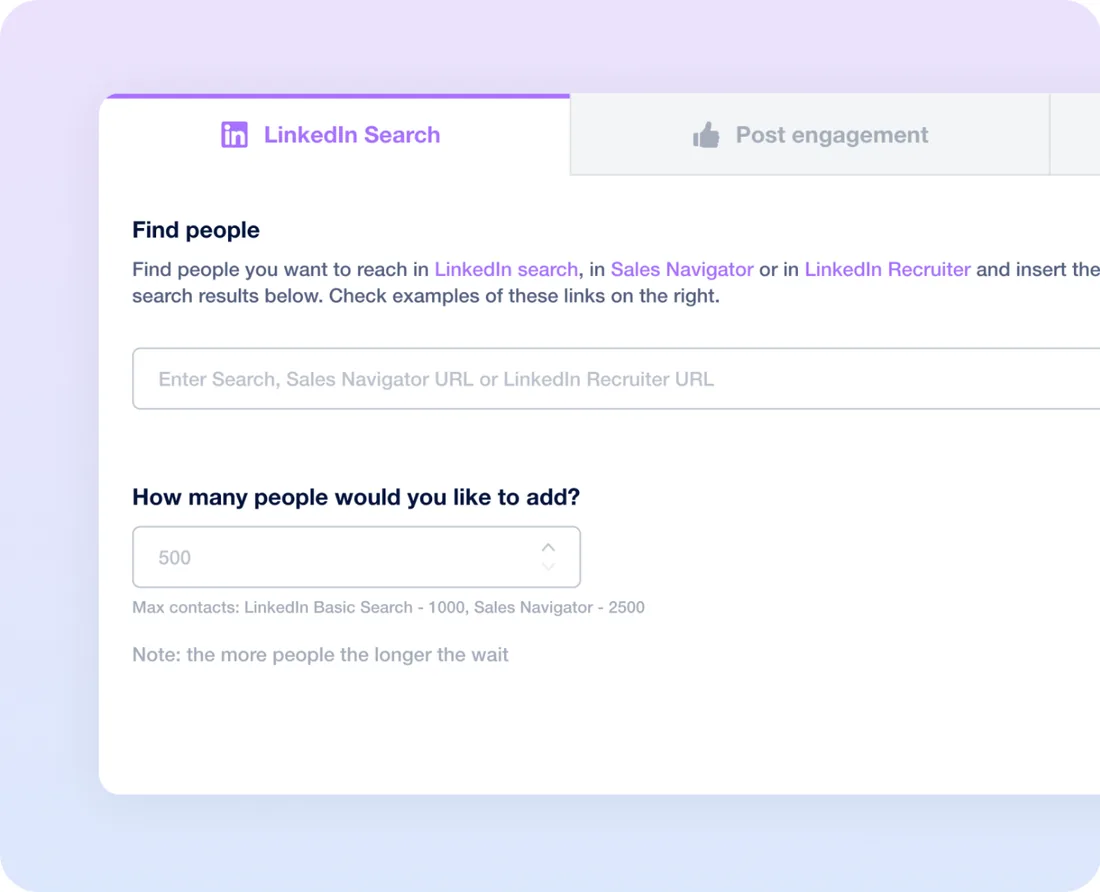
Once the account is in, you start a campaign from a lead source. Paste a LinkedIn search, Sales Navigator or Recruiter URL, and Closely adds 500 people by default. Sales Navigator goes up to 2,500, and a standard or Recruiter search stops at 1,000. Planning a bigger campaign? Split the search so each URL stays under its cap.
My trial stalled a second time here. The search only collected the first page of results, not the list I'd asked for. So check the lead count after every import, before you build a sequence on top of it.
Search isn't the only way in. Beyond a search URL, you can pull leads from:
- A LinkedIn post, event or group
- A CSV file with names and profile URLs
- Your first-degree connections, for message campaigns
- Closely's own contact database, paid with credits
The sequence builder
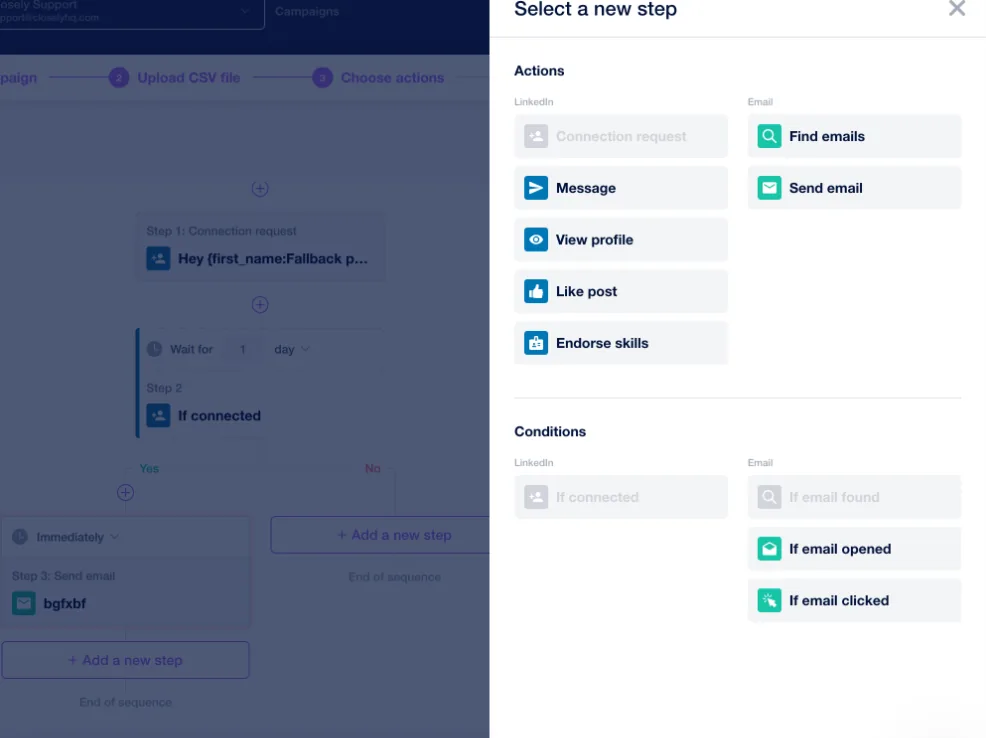
The builder gives you seven actions: a connection request, a message, a profile view, a post like, a skill endorsement, an email finder and an email.
With conditions, you split the path on four Yes/No questions. Did the lead connect? Was an email found, opened or clicked? A lead who never accepts can get an email instead, so one sequence covers both channels.
You'll spot two gaps in the step list. There's no InMail step, and there's no reply condition. A reply simply stops the sequence for that lead, and you can't change that.
So plan the whole campaign before you launch it. I couldn't edit a running campaign, only pause a lead, and a wrong step meant building the campaign again.
Check your CSV columns too. I had a custom variable land in the wrong field, and an empty one go out blank. It can be worse, as an AppSumo reviewer wrote in October 2026: "One empty cell stops the campaign for everybody."
Delays run in hours or days, and a scheduled step can drift by 10 to 60 minutes. Daily caps keep each account under LinkedIn's connection limits, and the safety section below has the numbers.
2. Email, enrichment and AI
Closely also sends email from the same sequence. Every plan takes unlimited email accounts through Gmail, Outlook or SMTP. Each campaign sends 50 emails a day by default, and you can raise that to 200.
Leads from LinkedIn need a Find email step before an email can go out. Finders, enrichment and AI-written first lines all run on credits, which Starter doesn't include.
There's no built-in email warm-up, though. You warm new mailboxes with a separate tool first, so budget a few weeks before a new domain sends at volume. Already warming inboxes elsewhere? Connect them as they are.
Some users report thin results from the finders. One AppSumo reviewer wrote in June 2026 that "it can only "verify" 5-10% of emails at most". Another, in April 2026, said the leads "just pull out yahoo, aol, gmail etc etc."
3. The inbox and CRM sync
The inbox gathers your LinkedIn conversations from every connected account. You filter by account, campaign or tag, keep notes on each thread, and push a contact or a deal to your CRM from there.
It isn't real-time. Conversations update each hour, and Closely's help center warns that new messages "can take up to a few hours to appear". In my use, replies did show up late, so treat it as a reply log, not a live chat.
To read your messages, it opens them on LinkedIn, so they show as read there. You lose the unread marker you'd use to triage. A Trustpilot reviewer wrote in January 2026 that "receiving appears to be every 2 hours, making it impossible to have an instant chat."
If you run HubSpot, Salesforce, Pipedrive, Zoho CRM or GoHighLevel, Closely connects to it natively. Its webhooks only send data out, and there's no public API. Some users report HubSpot trouble: an AppSumo reviewer said in June 2025 that the integration "creates duplicate entries".
4. White-label and client access for agencies
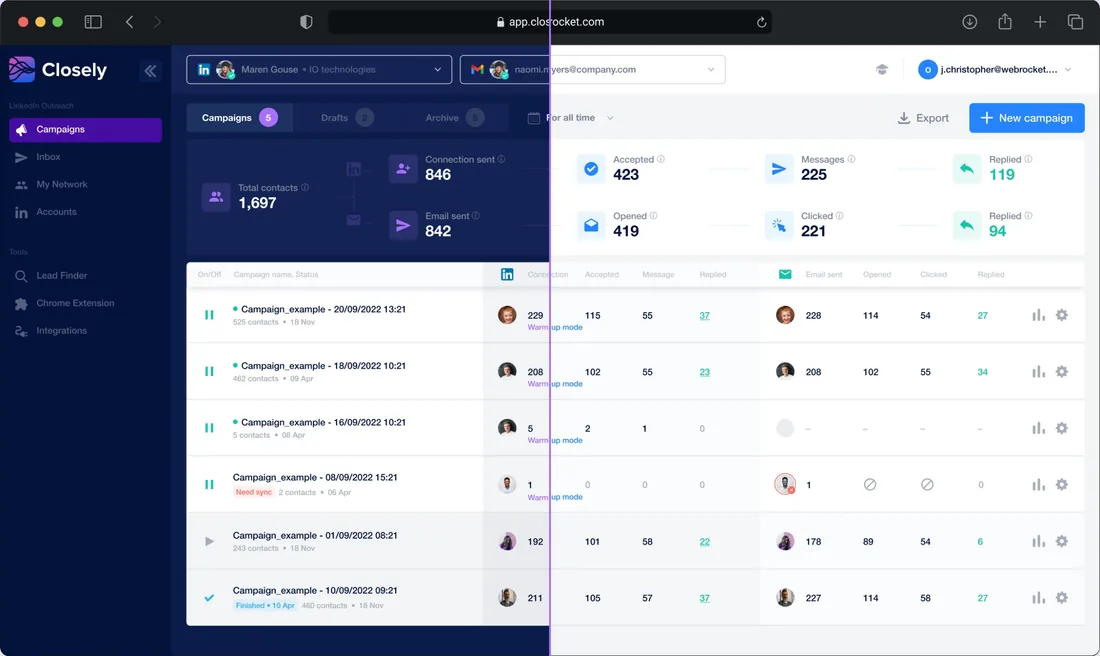
White-label is Closely's best feature, and it's on every plan, Starter included. You add your logo and colors, then serve the app from your own subdomain. You set it up yourself, at no cost.
If you resell outreach, your clients log in to your brand, not Closely's. That cuts both ways: when a campaign breaks or a card gets charged, it's your brand they see.
You get three roles, Owner, Admin and User, and a User sees only their own accounts. Only the Owner sets up integrations, and only the Owner can pay, upgrade or cancel.
When a client's campaign breaks, you lean on support. In my experience, the chat replied fast, but the fix took much longer. An agency reviewer on AppSumo wrote in March 2026 that "this has been escalated to the developers", with no fix four months on.
Client Access
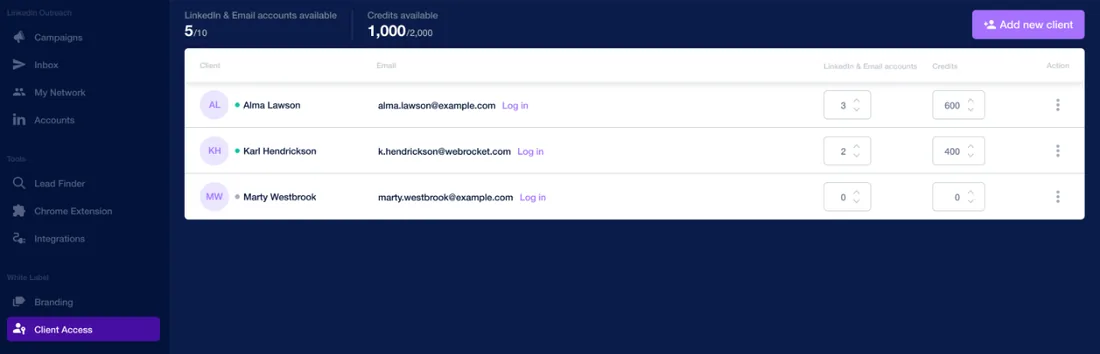
Client Access gives each client a login with a password you set. You assign LinkedIn and email accounts and credits to each one, and clients can invite their own teammates. For an agency billing clients separately, it keeps every account in its lane.
Is Closely safe?
Closely gives each LinkedIn account a dedicated residential proxy on every plan, but only in the US. Its help center puts it plainly: "For now, we don't offer local proxies."
On the trial, you get no dedicated proxy at all, so my October trial ran without one. The advice is to stay in warm-up mode until you pay, which keeps a trial account to a handful of invitations a day.
Your account starts in warm-up by default: three to five invitations a day in the first week, then eight to eleven in the second. Once it's established, you can go up to 30 a day, with a weekly ceiling of 100. You can switch warm-up off and set limits by hand, but on a new account you shouldn't.
Users report restrictions often: about 20 reports on AppSumo, Trustpilot and G2 between 2022 and 2025. One AppSumo reviewer set two connections a day and wrote in February 2025: "Despite these precautions, within 24 hours, LinkedIn restricted my account again."
No automation tool takes that risk to zero. If LinkedIn does restrict you, our guide to a restricted LinkedIn account covers the first steps.
Closely pricing
Closely charges per LinkedIn account, and each one comes with an email inbox. Extra email accounts are unlimited. Three plans have a set price:
| Plan | Price | Included |
|---|---|---|
| Starter | $65 per LinkedIn account a month | White-label, unlimited email accounts, no credits |
| Growth, 3 accounts | $159 a month | 3,000 credits a month, white-label |
| Essential, 5 accounts | $259 a month | 5,000 credits a month, success manager |
Need six accounts or more? A calculator prices each one. From thirty, you pay a flat $1,499 a month on Unlimited, capped at 100 LinkedIn accounts by its terms. The seven-day free trial takes no card.
The catch is billing. The in-app Cancel button only opens a request to support, and the help center admits the click "doesn't automatically stop your subscription". Refunds? "Closely has an unambiguous no-refund policy."
Users report the rest, and loudly. One Trustpilot reviewer asked Closely to stop the payments and wrote in October 2026: "They still charge." Another found it "impossible to unsubscribe or get a refund" in January 2026. Several call it a scam, one of them over the cancellation policy in September 2026.
That's why I stayed on the trial and didn't start a paid plan. If you do pay, I'd be cautious: note the renewal date the day you buy.
Leads in Sales Navigator? Add its cost for each account.
Yearly billing, credits and the cost at each team size are in our Closely pricing breakdown.
Is Closely right for you?
Closely suits an agency that wants a white-label app with LinkedIn and email in one sequence, and isn't worried about account restrictions or billing disputes. Look elsewhere if you want:
- Your LinkedIn accounts protected, with a proxy in your own country
- Campaigns that run the way you set them up
- A subscription you can cancel anytime
- InMail steps, or more leads from a Recruiter search
Replygrow: a safer Closely alternative
If you'd rather not bet your LinkedIn account or your card on a tool, Replygrow is the tool we built for that: safer accounts, campaigns that run as you set them up, and billing without surprises.
- Safer accounts: a dedicated residential proxy on every account, in the country you pick and from the first trial day, where Closely's are US-only and held back on the trial.
- A warm-up that protects new accounts: 14 days from 5 to 30 invitations a day, with daily limits on every action. Restrictions stay rare, though no tool can promise you'll never get one.
- Billing without surprises: pay monthly or yearly per LinkedIn account, and cancel anytime.
- Every LinkedIn feature on one plan: InMail steps and up to 2,500 leads per Recruiter search on your own LinkedIn plan, plus several accounts in one campaign.
- More replies: teams using Replygrow report a 15–35% higher response rate and 3x more meetings booked weekly.
- Easy to start: 7 days free with no card, and your account is protected from the first campaign.
With Replygrow, LinkedIn is the whole product, and account safety comes with every plan, not as an upgrade. Our pricing page lists the rate for any number of accounts.
Other Closely competitors
Three more worth a look:
- HeyReach, for agencies at volume
- La Growth Machine, for LinkedIn plus email
- Expandi, for deeper branching
- Waalaxy, Dripify and Meet Alfred round out the field
To weigh them all at once, open our LinkedIn automation comparisons.
Closely review verdict: is it worth it in 2026?
Our score
1.5/5
Closely's white-label is strong, but a shaky first connection, a one-page search, a lagging inbox, and users' reports of restrictions and charges after cancelling pull it down.
Closely looks complete on paper, but it asks you to take two risks: one with your LinkedIn account and one with your card.
That's where this Closely review lands. White-label on every plan is a real draw. But connecting LinkedIn failed at first in my trial, the search stopped after one page, and the inbox lags by hours. Users report restricted accounts, and charges that kept coming after they asked to cancel.
Replygrow takes the lead on safety: a proxy in your country from the first trial day and warm-up on every account. Add InMail steps, 2,500 leads per Recruiter search, several accounts in one campaign, and a plan you can cancel anytime.
Frequently Asked Questions
1) Is CloselyHQ legit?
Yes, it's a real product from a registered company: Esterson Limited, in Nicosia, Cyprus. It's rated 4.6 from 196 reviews on G2 but 1.4 from 79 on Trustpilot, where several reviewers call it a scam.
2) How much does Closely cost?
Starter costs $65 per LinkedIn account a month. Growth is $159 for three accounts and Essential $259 for five. A calculator prices six to 29 accounts, and Unlimited is $1,499 a month from 30.
3) Does Closely have a free trial?
Yes: seven days with no card. The dedicated proxy isn't allocated during the trial, and Closely advises staying in warm-up mode until you pay.
4) Is Closely safe for LinkedIn?
Not risk-free, and no automation tool is. Closely's proxy is US-only and missing from the trial, and users report restrictions between 2022 and 2025, one of them on just two invitations a day.
5) How do I cancel Closely?
Send support a cancellation request before your renewal date, with your account email, your last payment and a reason. The in-app Cancel button only contacts support, and refunds are limited to a discretionary two days after a first purchase.
6) What are the best Closely alternatives?
Replygrow, the tool we built, comes first if you want your account and your billing safe: a proxy in your country from the first trial day, warm-up on every account, InMail and Recruiter campaigns, and a plan you can cancel anytime. HeyReach, La Growth Machine and Expandi are worth comparing too.
7) Closely vs Replygrow: what's the difference?
Closely puts white-label on every plan and email in the same sequence, but users report restricted accounts and charges after cancelling. Replygrow is built around LinkedIn and account safety: a proxy in the country you choose from the first trial day, warm-up on every account, InMail steps, up to 2,500 leads per Recruiter search, and a plan you can cancel anytime.
Get 3x more replieson LinkedIn
Set up in minutes. 7-day free trial, no credit card.
Try Replygrow free